Changelog
Documenting our journey of creating a custom sign builder on the shopify platform.

Filter by Tag
-
Increased Form File Upload Limit & New Admin for Form Entries
Increased File Upload Limit
We have increased the maximum file upload size for all forms from 2 megabytes to 10 megabytes. This is a significant upgrade that will benefit all merchants using our forms, allowing your customers to upload much larger files with their submissions. This improvement is especially useful for customers who need to submit high-resolution images, detailed artwork, or complex design files.
Supported file types for uploads include:
- Images: PNG, JPEG, SVG
- Documents: PDF, PostScript (EPS), Adobe Illustrator (AI)
This broad support ensures your customers can upload the most common file formats used in the sign and design industry.
Brand New Admin for Form Entries
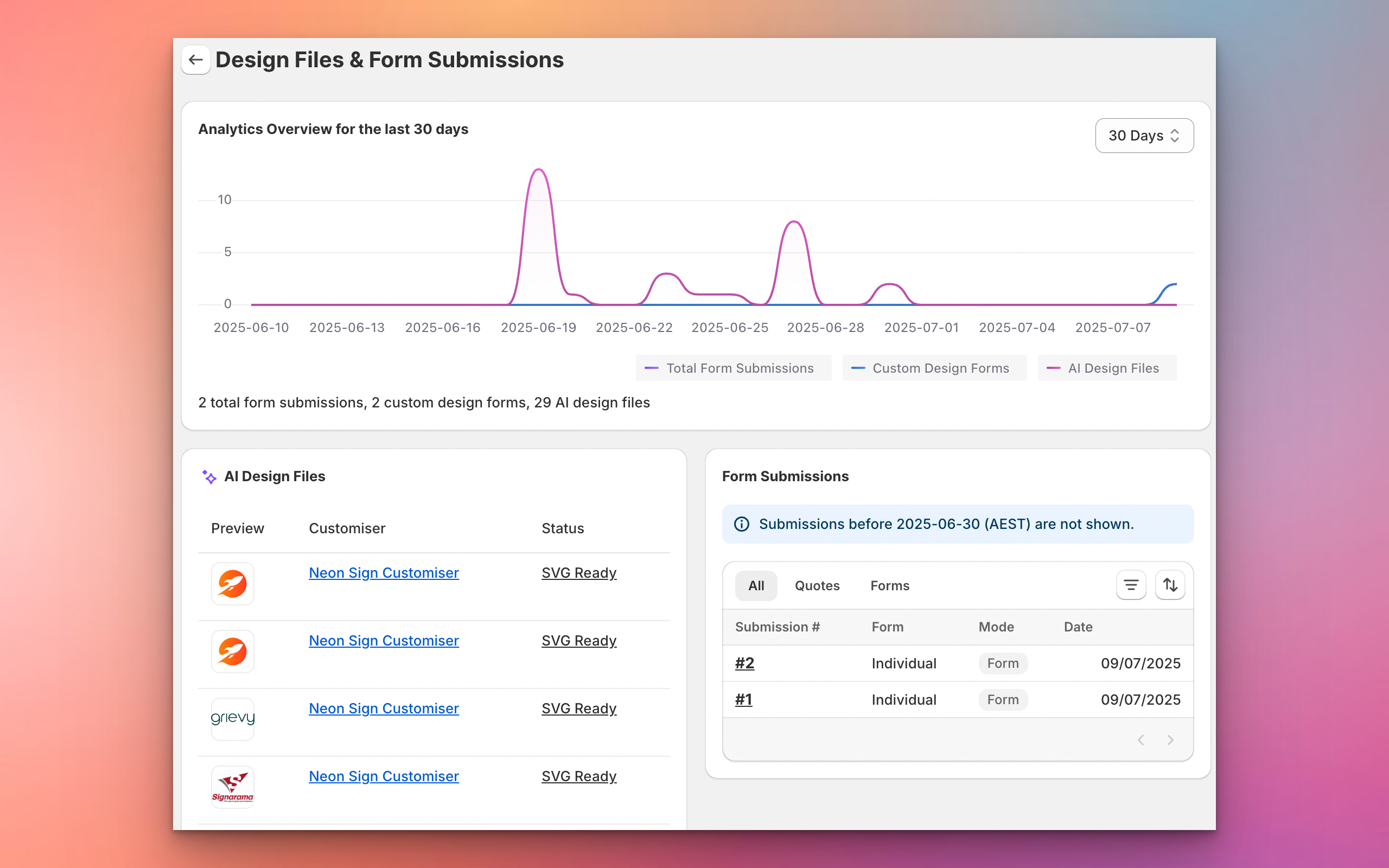
We have also launched a completely new admin interface that allows merchants to view all new form entries directly within the app. This new admin makes it easy to:
- View all data submitted through your forms in one place
- Quickly access uploaded files and customer details
- Manage and respond to customer submissions efficiently
This update streamlines your workflow and ensures you never miss an important customer request or file upload.
New: Tracking Events for Form Submissions
We have set up custom tracking events for form submissions. These events can be used for ad conversions or tracking in platforms like Google and Facebook. You can now listen for these events in your store to track when a customer submits a form or a quote request.
The two new events are:
signCustomiserFormSubmitted(for standard form submissions)signCustomiserQuoteSubmitted(for quote form submissions)
For more details and code examples, see our documentation: Tracking events for ad conversions
Improved After Submission Actions
We have also improved the after submission actions for forms. Merchants can now choose to show a thank you message or redirect customers to a custom page on your website after a form is submitted. This gives you more control over the customer experience and helps drive engagement or provide next steps.
-
Enhanced Order and Manufacturer Email Templates
We’ve completely redesigned how you create and edit your order and manufacturer email templates to make customization much easier and more reliable. The new template editor features advanced code highlighting, real-time error detection, and intelligent fix suggestions that guide you through creating professional email templates without technical expertise.
No more guessing about template syntax or wondering why your emails aren’t displaying correctly. The editor now highlights your code as you type, instantly identifies any errors, and provides clear suggestions on how to fix them. You can also browse and insert customer, order, and product variables directly from the editor, making it simple to personalize your emails with dynamic content that your customers and manufacturers need.
-
Improved Fixed Height Strategy for Simple Model
We’ve significantly simplified how you set up sizing strategies for your simple letter model customisers. This update makes it much clearer and easier to choose between fixed width and fixed height approaches for your sign sizing.
What’s New
Simplified Size Strategy Selection
You can now easily choose your preferred sizing approach directly in the size configuration:
- Fixed Width - Height scales dynamically: Set a specific width in centimeters, and the height will automatically scale based on your text content
- Fixed Height - Width scales dynamically: Set a specific height per line in centimeters, and the width will automatically scale based on your text content.
Key Benefits
-
Clearer Setup Process: No more confusion about which sizing strategy to use - simply choose between fixed width or fixed height based on your manufacturing needs
-
Simplified Configuration: The admin interface now clearly shows which dimension is fixed and which will scale dynamically
-
Consistent Terminology: We’ve standardized the internal naming to be more intuitive and less confusing
-
Better User Experience: Merchants can now easily understand and configure their preferred sizing approach without technical complexity
How It Works
When creating or editing a size in your simple letter model customiser:
- Navigate to your customiser’s “Sizes” section
- Create a new size or edit an existing one
- Choose your preferred “Size Strategy”:
- Select “Fixed Width” if you want consistent sign widths with varying heights
- Select “Fixed Height” if you want consistent line heights with varying widths
- Enter the relevant measurement (width in cm for fixed width, or height per line in cm for fixed height)
For more information on setting up sizes, please visit our documentation.
-
Oval Lightbox Support
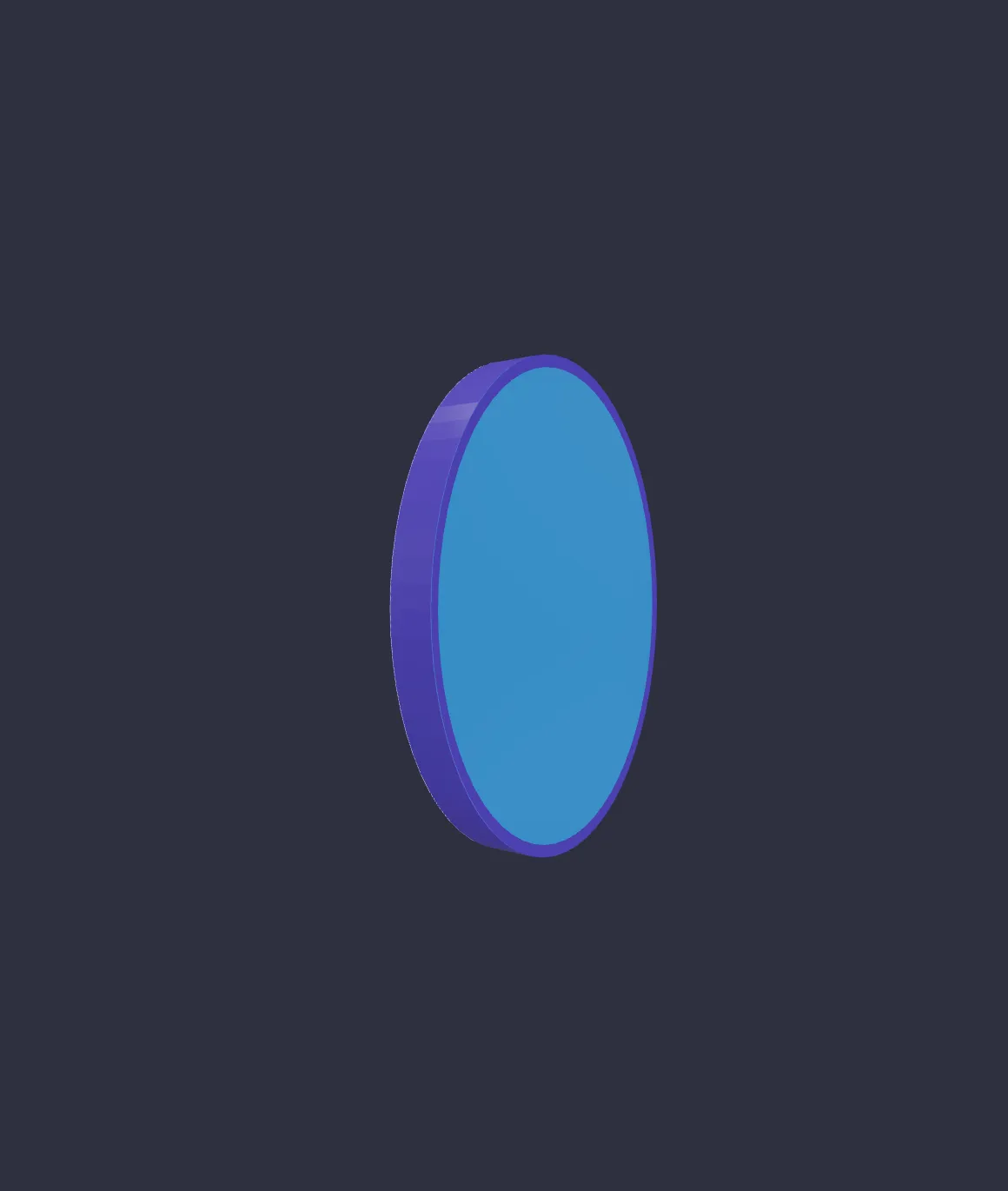
Lightbox signs that used the circular shape were previously constrained to have the same width and height.
This latest update adds support for varying width and height allowing for shapes like ovals to exist:
-
Lightbox Signs Now Available
We’re excited to announce the launch of our new lightbox customiser feature! This update brings a powerful 3D renderer and extensive customization options to help you create and visualize lightbox signs with unprecedented accuracy.
Check out the video below to see it in action:
Live Demos
3D Visualization
- New 3D renderer for realistic lightbox visualization
- Interactive rotation and zoom capabilities (both desktop and mobile)
- Environmental lighting effects for realistic material rendering
- Adjustable viewer size to match device or preference
- Background scene customization with image upload support
Lightbox Shapes
- Rectangular lightbox support
- Circular lightbox support
- Custom sizing with precise measurements
- Preset sizes (small, medium, large, cube)
- Accurate 3D representation based on input measurements
Customization Features
- Individual side customization (front, back, left, right, top, bottom)
- Multiple material options:
- Acrylic
- Metallic
- Hybrid materials
- Customizable border wrapping
- Internal light source with:
- On/off toggle
- Multiple color options
- Multi-color support
- Adjustable lighting effects
Image Upload Capabilities
- Support for multiple image file types (JPEG, PNG, WEBP, AVIF)
- Transparent image support
- Automatic image cropping based on lightbox dimensions
- Individual image uploads for each side
- Original and cropped image preservation
Admin Controls
- Multiple lightbox shapes per customizer
- Individual side control and configuration
- Material and color assignment per side
- Border type customization
- Flexible configuration options
- Updated background scene editor
- Integration with existing Sign Customizer features
Technical Notes
- Compatible with existing Sign Customizer infrastructure
- Maintains all standard mounting options
- Visual support for mounting options coming soon
- Currently in initial release phase
- Actively collecting feedback for future improvements
This is our initial release of the lightbox feature, and we’re actively seeking merchant feedback to guide future improvements. We’re excited to see how you’ll use this new customiser type in your stores!
-
Example popup image improvements
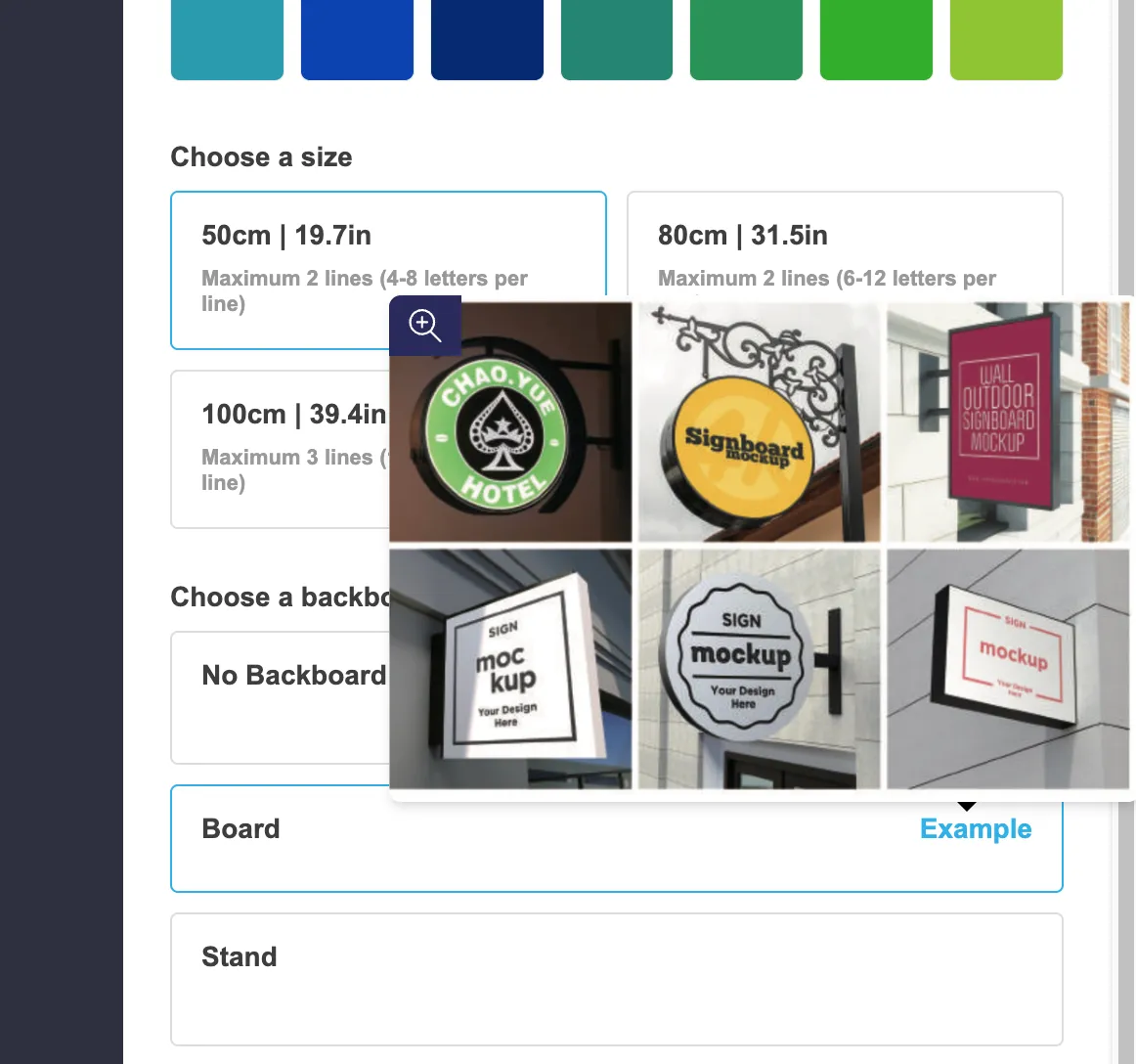
In some scenarios, example images were being cut off and not displaying the full preview:
We have just released an update which fixes this issue and greatly improves the overall user experience.
- On desktop devices, the example now appears when you hover over the “example” button. It will intelligently display above or below the label depending on where the user has scrolled to. Clicking on the zoom icon or the example button will open this image in full screen.
-
On mobile devices, tapping the example button immediately opens it in a full screen view ensuring the image is never cut off.
-
A new setting has been added which enables example images appearing on hover for some selections such as the text color. To enable this, go to the “General Settings” tab of your customiser and find the “Desktop Style Options” heading.
-
Visually scale signs relative to backgrounds and sizes
This update contains two new features:
Visual Size Scaling
We have added a new setting, which when enabled, will make your signs appear larger or smaller in the visualiser based on the size you have selected.
For example if the selected size is 50cm and you change to the 80cm size, your text will appear visually bigger in the customiser.
Learn more about setting this up in our documentation:
https://docs.signcustomiser.com/en/articles/10748671-visually-scale-signs-based-on-the-chosen-size
Sign scales visually relative to background image
You can now specify a width and height for background images. When these values are set, the visualiser will show the sign proportionally to the background measurements.
For example if your background is 300cm wide and the sign is currently 150cm, it will appear as half the width of the background.
If you allow users to upload custom backgrounds they will be prompted to provide their own measurements.
Learn more about setting this up in our documentation:
https://docs.signcustomiser.com/en/articles/10529528-background-images
-
Faster page loads for iframe customisers
Customers who are using iframes to embed their customisers on their stores should now see significant speed improvements when loading their pages.
These initial load speeds should help with your overall Google Pagespeed performance scores, which attributes to the overall SEO of your customiser pages.
You can check your stores pagespeed score yourself by visiting https://pagespeed.web.dev/.
-
Fixed heights per line for simple letter model customisers
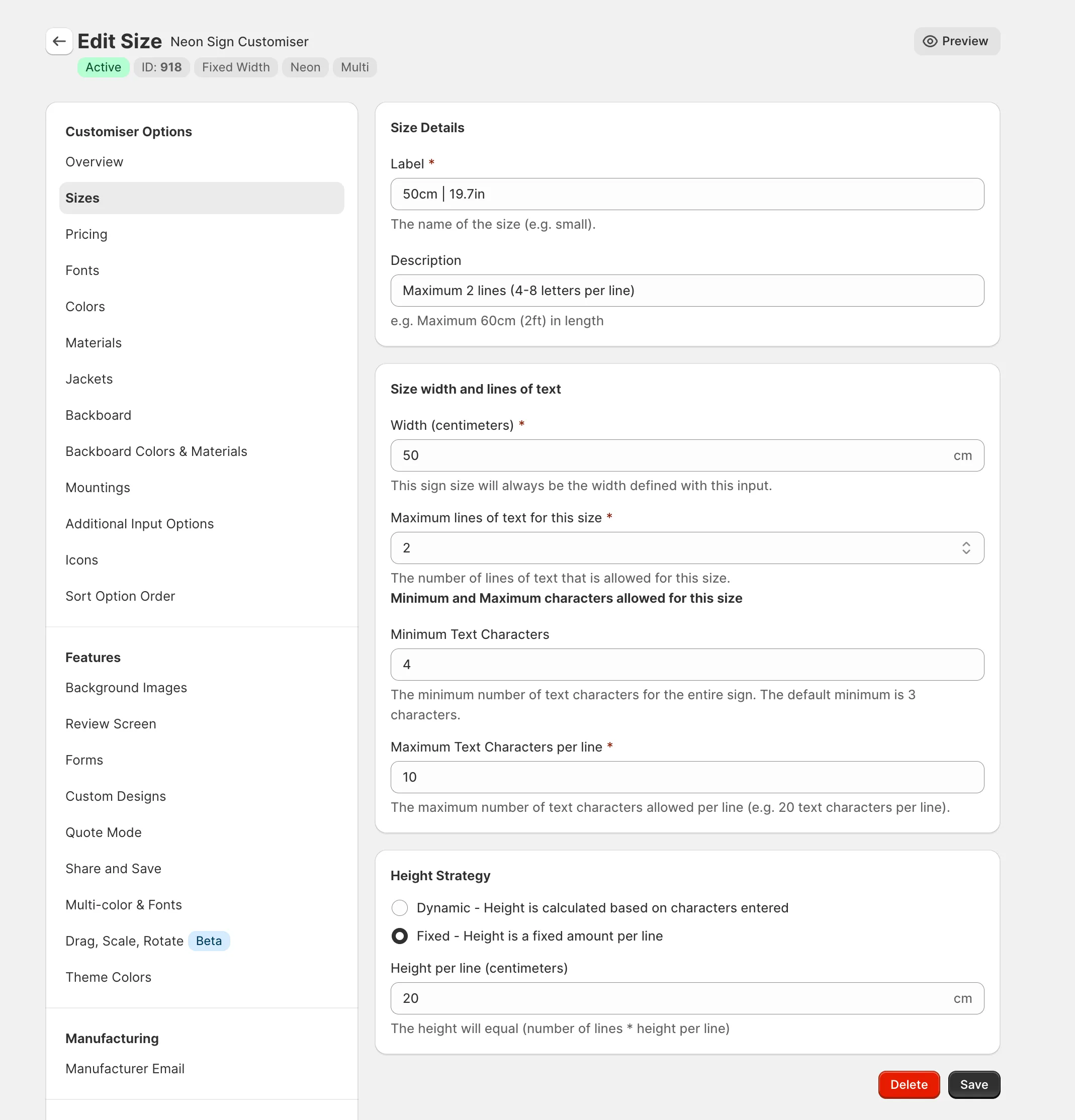
Simple letter model customisers now have an option to change the way height is calculated.
You have two options:
- Dynamic - This is the default and is how the height is currently calculated. Height is determined based on the dimensions of characters and font selected.
- Fixed - (New) You can specify in centimetres how tall each line will always be. This number gets multiplied by the number of lines of text entered.
-
Frame Fit Model
A new pricing and sizing model has been introduced to accomidate new sign type we are introducing. This model focuses on the frame of a sign rather then the letters for all measurements and pricings calculations.
Previously our three existing models where built for handling letter type signs, this new model is built for signs types as Wooden board / aluminium plate / acryic plate and lightbox signs.
Two new demos have been created and are are also installable templates for your store.
Find out more how framefit works.
