Generic Customisers Miss What Makes Signs Different
Product customizer apps on Shopify were built for t-shirts and engraved jewellery. They handle “upload your image” and “add custom text” well enough. But signs require something fundamentally different: the app needs to understand that “HELLO” costs less than “CONGRATULATIONS” because it uses less neon tubing.
Generic apps don’t calculate LED tube length from font geometry. They don’t render realistic neon glow effects. They can’t generate production-ready SVG files that go straight to CNC machines.
This guide compares Shopify product customizer options specifically for sign businesses. If you’re selling neon, acrylic, or metal signs, the tool you choose directly impacts your conversion rates, profit margins, and operational efficiency.
Read the Complete Shopify Sign Store Guide
What Sign Customisation Actually Requires
Before comparing apps, understand the technical requirements that make sign customisation different from generic product personalisation.
Dynamic Text with Real-Time Pricing
Customers type “Happy Birthday Sarah” and need to see instantly: what it looks like, how big it is, and what it costs. Generic product builders show static mockups or dropdown options. Sign customisers calculate pricing from actual text input and font characteristics.
Font Path Calculations
A cursive font uses more neon tubing than a block font for the same word. Material length pricing requires analysing the actual vector paths of each letter to calculate material usage. This is computationally intensive and requires font-specific data that generic apps don’t have.
Sign-Specific Rendering
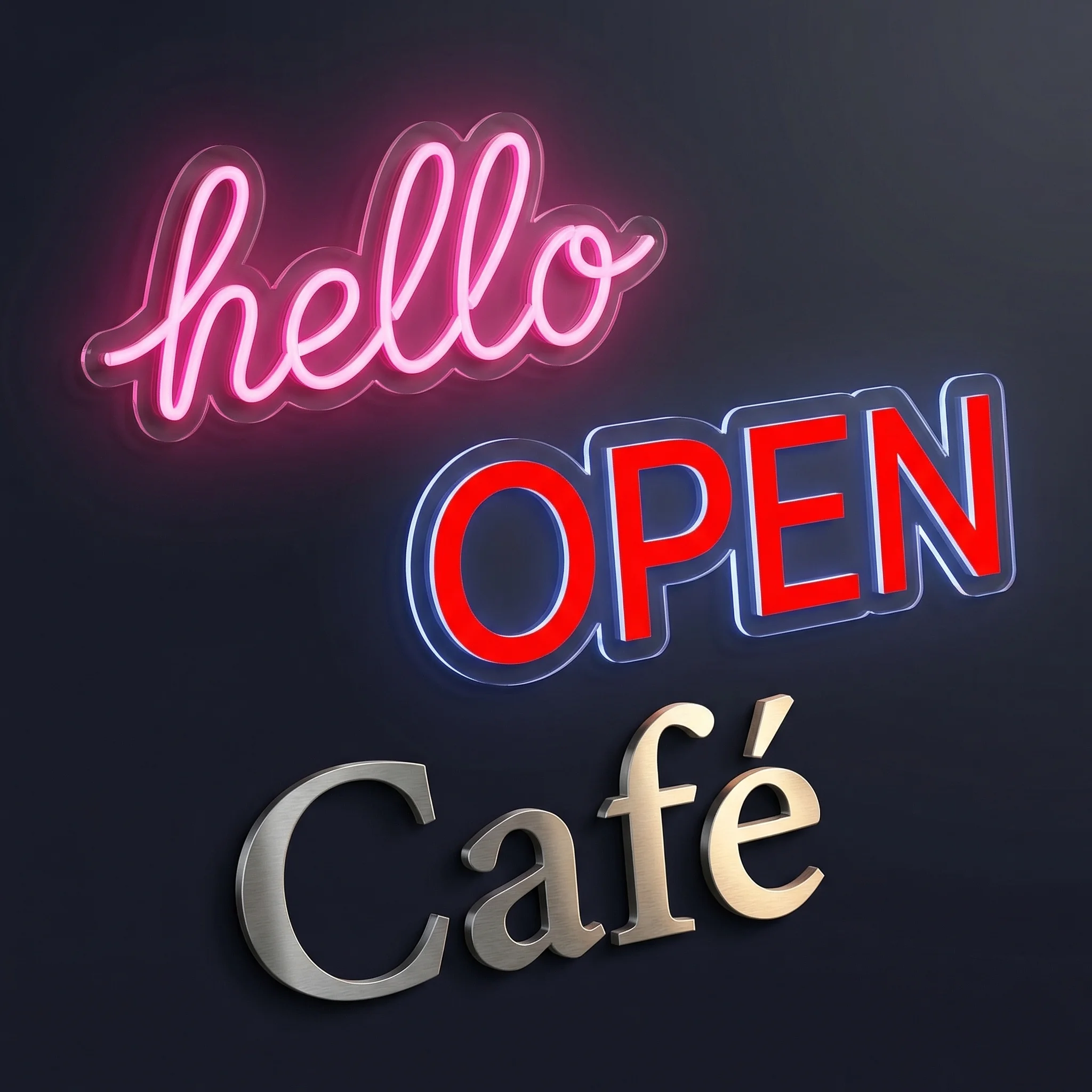
Neon signs glow. Acrylic has depth and light refraction. Metal has brushed or polished finishes. Generic mockup systems paste text onto a background image. Sign-specific renderers simulate actual material properties with proper lighting, shadows, and depth effects.
Production File Output
When orders arrive, someone needs to manufacture the sign. Production teams need vector files with exact dimensions, cut paths, and specifications. Generic apps output images. Sign tools output production-ready SVGs and detailed manufacturing specs.
Three Categories of Shopify Customiser Apps
Category 1: General Product Customisers
Apps: Customily, Zakeke, Product Personalizer, Inkybay
These apps serve the broader personalisation market: engraved gifts, printed apparel, custom phone cases. They’re designed for businesses selling 10+ different product types.
What they do well:
- Handle image uploads and text overlays
- Support conditional logic for options
- Work with many product types
- Often cheaper ($20-40/month)
Where they fall short for signs:
- Pricing is per-product or per-option, not per-material-length
- No neon glow, acrylic depth, or metal finish rendering
- Cannot calculate actual LED tube requirements from text
- Generate images, not production-ready vector files
- Font rendering is basic—no sign-industry font optimisation
Verdict: Workable if signs are 10% of your catalogue and you only need basic text customisation. Not viable for a serious sign business where realistic previews and accurate material-based pricing drive profitability.
Category 2: Option Builder Apps
Apps: Product Options & Customizer by Bold, Infinite Options, Variant Option Product Options
These apps add dropdown menus, checkboxes, and swatches to product pages. Customers select options; prices adjust accordingly.
What they do well:
- Simple setup for variant-based products
- Clean integration with Shopify themes
- Conditional logic between options
- Lower price point ($15-30/month)
Where they fall short for signs:
- No real-time visual preview of any kind
- Customers select “Medium Size” without seeing their actual text
- Pricing is tier-based, not calculated from actual design
- Requires customers to imagine what “Large Blue Neon Sign” means
- Zero production file generation
Verdict: Fundamentally inadequate for custom text signs. Customers won’t spend $300 on something they can’t visualise. These apps work for size and colour selection on pre-designed signs, nothing more.
Category 3: Sign-Specific Customisers
Apps: Sign Customiser, proprietary tools built by large neon companies
Purpose-built for the sign industry with features that don’t exist in general-purpose tools.
What they do well:
- Realistic neon, acrylic, and metal rendering with proper lighting
- Material length pricing that calculates actual tube/LED requirements
- Production-ready SVG output with manufacturing specifications
- Font libraries optimised for signage (single-stroke fonts, script handling)
- Automated manufacturer workflow integration
Limitations:
- Higher price point ($49-149/month)
- Focused exclusively on signs
- More configuration required upfront
- Learning curve for advanced pricing models
Verdict: The right choice if custom signs are your primary business. The specificity is the point—these tools solve problems generic apps don’t even recognise exist.
Feature Comparison Table
| Capability | Generic Customisers | Option Builders | Sign Customiser |
|---|---|---|---|
| Real-time text preview | Static mockup | None | Live rendering |
| Neon glow effects | No | No | Yes, adjustable |
| Material length pricing | No | No | Calculates from font paths |
| SVG production files | No | No | Auto-generated per order |
| Multi-line text handling | Basic | No | Advanced with line spacing |
| Font library | Generic web fonts | None | Sign-optimised collection |
| Backboard customisation | No | Dropdowns only | Visual with dimensions |
| Manufacturer email automation | No | No | Built-in with specs |
| Frame fit pricing | No | No | Area-based calculation |
| Mobile experience | Varies | Good | Touch-optimised |
| Monthly cost | $20-40 | $15-30 | $49-149 |
What Makes Sign Customiser Different
Since sign-specific tools matter most for sign businesses, here’s what Sign Customiser does that others can’t.
Realistic Material Rendering
The preview isn’t text pasted on an image. It’s a computational render of what neon actually looks like:
Neon signs: Light bleeding, tube appearance, glow radius that varies by colour (white glows wider than red). The render accounts for how neon actually behaves optically.
Acrylic signs: Material depth, edge lighting effects, backboard shadows. Customers see dimension, not flat graphics.
Metal signs: Brushed steel reflection patterns, powder coat finishes, cut-edge bevels. The render shows material properties.
This matters because higher-fidelity previews produce higher conversion rates. Customers buying a $400 sign need visual confidence.
Four Pricing Models for Different Sign Economics
Fixed Width Pricing: Simple tier-based pricing by character count. “1-10 characters = $149, 11-20 = $199.” Best for getting started quickly with predictable margins.
Material Length Pricing: The system traces the actual font paths for the customer’s text and calculates total LED or neon tube length. A script “Emma” uses more material than a block “EMMA”. Price reflects actual manufacturing cost. Learn more about pricing models.
Frame Fit Pricing: For signs with fixed backboard dimensions. Price based on frame area regardless of text length. Ideal for lightbox signs and mounted displays.
Per-Letter Pricing: Each letter priced individually. Common for dimensional channel letters where manufacturing is per-piece.
Generic apps offer “add $X per character” at best. They can’t calculate that a cursive font uses 40% more tube than a sans-serif for identical text.
Production Workflow Integration
When an order comes in, Sign Customiser generates:
- Vector SVG files with exact cut paths and dimensions
- Manufacturing specifications (colours, sizes, materials)
- Automated emails to your production partner
- Order notes attached to Shopify orders
This automation saves 15-20 minutes per order. At 50 orders monthly, that’s 12+ hours of manual work eliminated.
Font Intelligence
Not all fonts work for signs. Script fonts need proper stroke widths. Display faces require adequate letter spacing. Sign Customiser’s font library is curated for signage:
- Single-stroke fonts optimised for neon tubes
- Script fonts with proper connector handling
- Custom font upload with automatic validation
- Accurate size calculations per font family
Cost Analysis: Is the Higher Price Justified?
Generic customisers cost $20-40/month. Sign Customiser costs $49-149/month. Here’s how to evaluate the difference.
Hidden Costs of Generic Apps
Lost sales from poor previews: Generic mockups don’t show realistic neon glow. Customers hesitate to spend $300-500 on something that looks like clip art. Industry data suggests realistic previews improve conversion rates 15-25%.
Pricing inaccuracies: Without material length calculations, you either underprice (eroding margins) or overprice (losing sales). A 10% pricing error on $10,000 monthly revenue is $1,000/month in lost profit or margin.
Manual processing time: Without automated SVG generation and manufacturer emails, expect 15-30 minutes per order for manual spec creation and file preparation.
Customer support load: Vague previews generate questions. “What size will my sign be?” “Is this exactly what it looks like?” Each email costs time.
ROI Calculation
Assume 50 orders/month at $250 average order value:
Time savings: 20 minutes saved per order × 50 orders = 16.7 hours/month Value at $30/hour: $500/month saved
Conversion improvement: 20% better conversion rate on $12,500 revenue Additional revenue: $2,500/month (minus COGS)
Cost difference: $100/month more than generic app
The math works unless your volume is extremely low. At 10+ orders monthly, Sign Customiser pays for itself in time savings alone.
When to Use What
Use a Generic Customiser If:
- Signs represent less than 20% of your product catalogue
- You only offer pre-designed signs (no custom text)
- Your budget is under $50/month total for apps
- You’re testing the market before committing
- You only sell one simple sign type with fixed pricing
Use Sign Customiser If:
- Custom signs are your primary product line
- You need accurate material-based pricing to protect margins
- Realistic previews matter for your price point ($200+ signs)
- You want production automation to scale operations
- You sell neon, acrylic, and metal signs with different rendering needs
- You work with manufacturers who need production files
Migration Path: Switching from a Generic App
Already using a different customiser? Here’s how to switch without disrupting sales.
Week 1: Parallel Installation
Install Sign Customiser alongside your existing app. Configure one product type as a test. Keep the old app running on other products.
Week 2: Configuration and Testing
Set up your pricing models, fonts, and rendering options. Order test purchases yourself. Verify SVG output works with your manufacturer.
Week 3: A/B Comparison
Run both apps on similar product pages. Compare conversion rates. Monitor customer support inquiries. Check order processing time.
Week 4: Decision and Rollout
If Sign Customiser converts better (it usually does), migrate remaining products. Keep the old app installed but inactive until you’re confident in the switch.
Common Migration Issues
Font differences: Your existing fonts may not be in Sign Customiser’s library. Upload custom fonts or select similar alternatives.
Pricing adjustments: Material length pricing may calculate different prices than your old tier-based approach. Audit your margins before going live.
Customer expectations: Existing customers may notice the different preview style. This is usually positive—the realistic renders look better.
Frequently Asked Questions
The Recommendation
For Shopify stores where custom signs are the core business, use Sign Customiser.
Generic customisers work for gift shops that sell personalised mugs alongside a few pre-designed signs. They don’t work when customers need to type “Happy Anniversary Mom & Dad” and see realistic neon rendering with accurate pricing before spending $350.
The monthly cost difference—roughly $60-100 more than generic options—pays for itself through:
- Higher conversion rates from realistic previews
- Protected margins from accurate material-based pricing
- Saved hours from automated production file generation
- Reduced support inquiries from confident customers
Try Sign Customiser Free
Related Resources
Building a sign store involves more than choosing a customiser. These guides cover the complete picture:
- Complete Shopify Sign Store Setup Guide - Full walkthrough from installation to scaling
- Sign Pricing Models Explained - Deep dive into fixed width, material length, and frame fit pricing
- How to Start a Neon Sign Business on Shopify - Business planning, manufacturer selection, and marketing
- Custom Neon Signs Cost Guide - Understanding sign economics and pricing strategy