Changelog
Documenting our journey of creating a custom sign builder.

-
Submit feature ideas directly from your dashboard
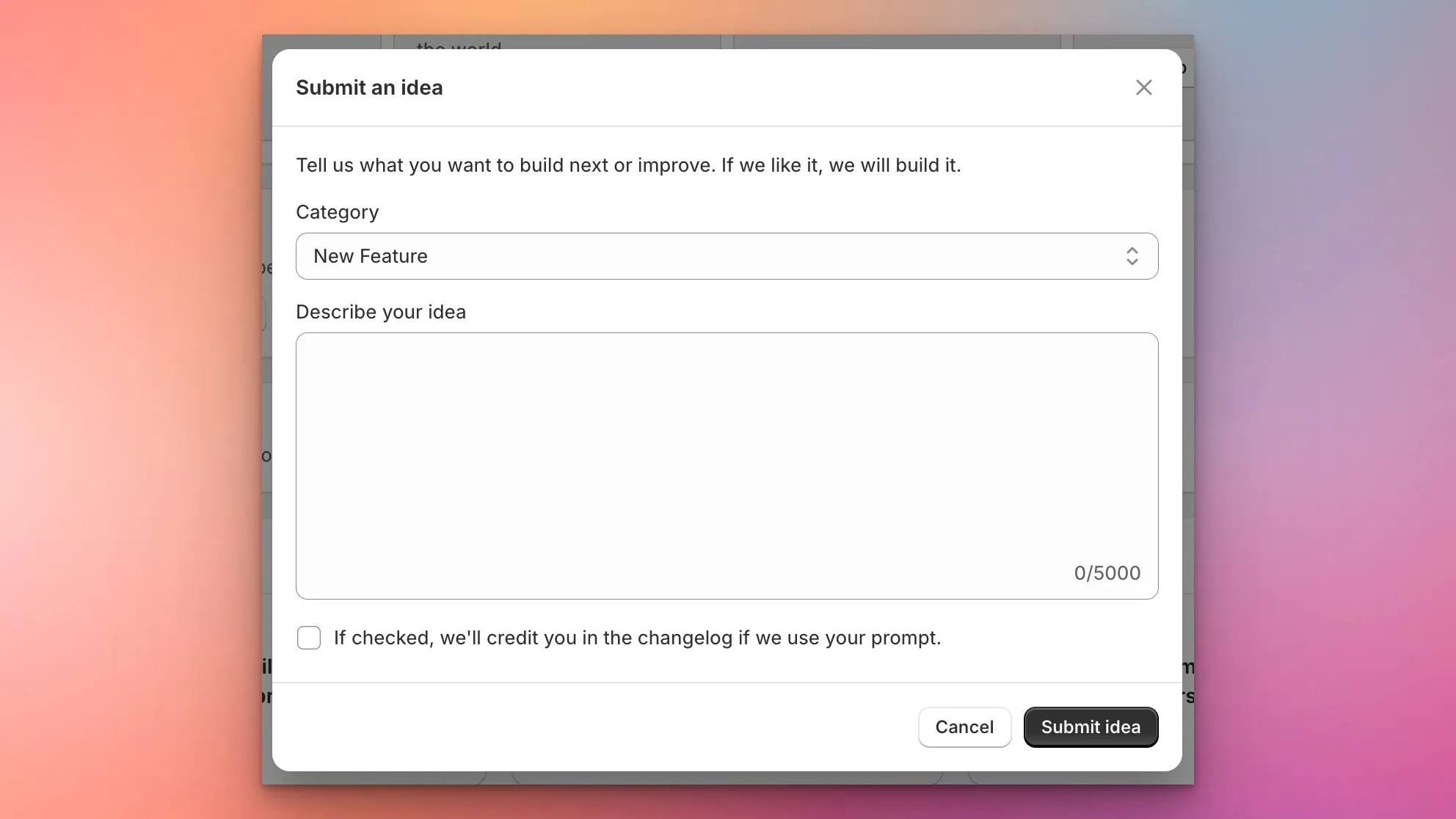
Sign Customiser now makes it easier than ever to shape the product roadmap. A new “Submit an Idea” card on your dashboard lets you describe the features, enhancements, integrations, or fixes you want to see — and our team will review every submission and create an implementation plan.
What’s Changed
- In-app idea submission - A new card on the dashboard opens a modal where you can describe your idea in detail, with up to 5,000 characters
- Categorised requests - Choose from New Feature, Enhancement, Integration, Bug Fix, or Other so your idea reaches the right team
- Automatic planning - Every submission triggers an internal review and implementation plan, so your ideas move from concept to action faster
- Changelog credit opt-in - A checkbox lets you opt in to being credited in the changelog if we ship a feature inspired by your idea
-
Customiser Presets — Save and Load Sign Configurations
Sign Customiser now lets you save any sign configuration as a reusable preset. Whether you want to showcase your most popular designs, simplify the buying experience for returning customers, or promote seasonal collections, presets make it easy to offer ready-made starting points directly from your storefront.
What’s Changed
- Save designs as presets — Preview any sign configuration in the admin panel and save it as a named preset with a single click, capturing the full design including text, colours, fonts, sizes, and selected options
- Manage presets from the admin — A new Presets page in the customiser sidebar lets you view, rename, reorder, and delete your saved presets at any time
- Load presets on the storefront — Share a direct link to any preset using its unique code, and customers will see the customiser pre-filled with your chosen configuration, ready to personalise further
- Theme app extension support — Presets integrate with the Shopify theme app block, so you can embed preset-specific customiser links directly into your store pages and collections
- Drag and drop reordering — Organise your presets in the exact order you want them displayed using the familiar drag-and-drop interface
-
Customisable email templates for custom design submissions
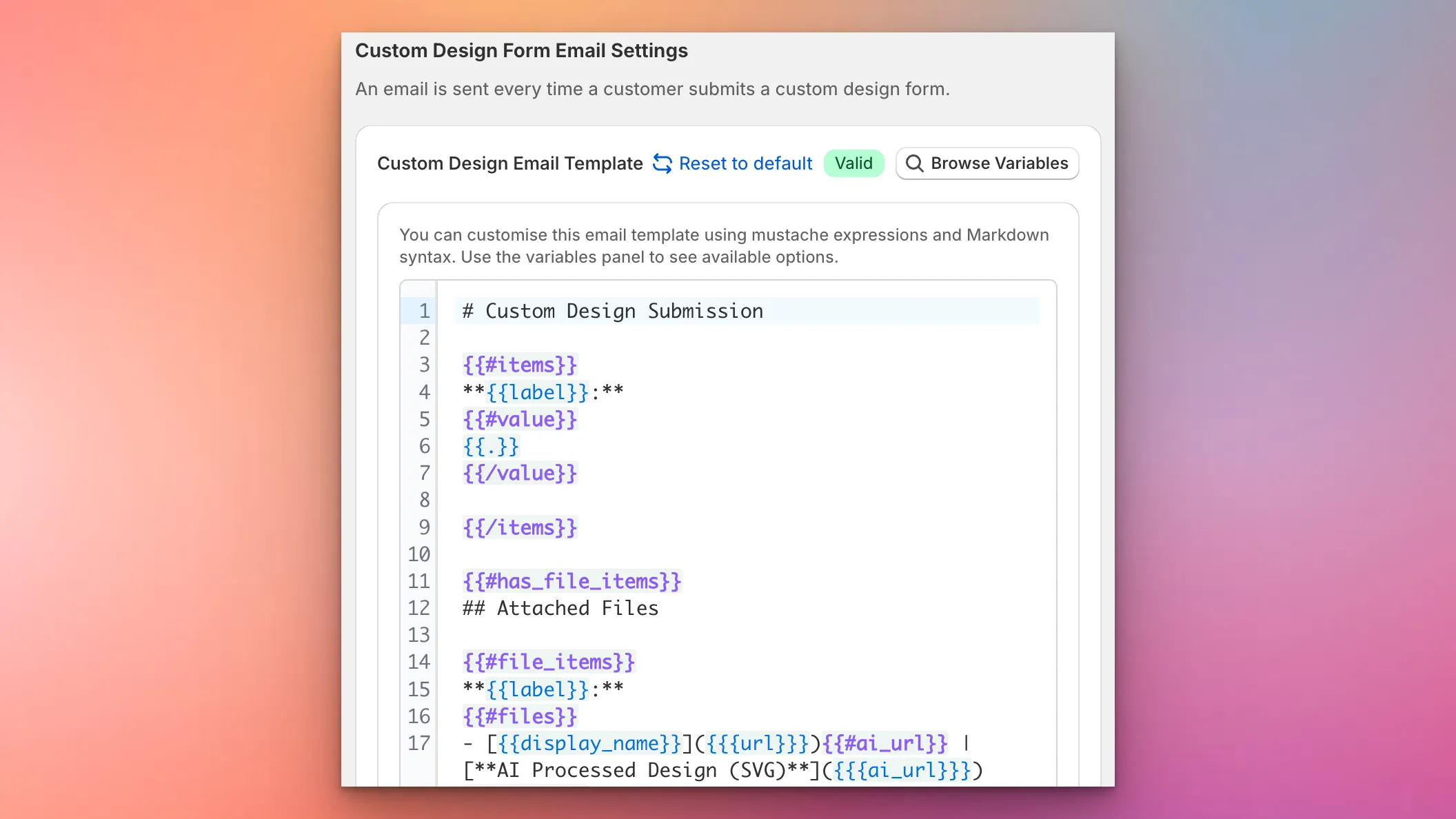
Sign Customiser now gives you complete control over the content and layout of custom design submission emails. Using a powerful template editor with Mustache syntax and Markdown support, you can structure these emails exactly how you need them for your workflow—whether that’s optimising for forwarding to manufacturers, integrating with your CRM, or simply making the information easier to scan.
What’s Changed
- Custom email template editor - A new template editor in the Custom Design Form settings lets you define exactly how submission emails are structured using Mustache expressions and Markdown
- Full variable support - Access all form field values, uploaded files, product images, and AI-processed designs through template variables
- Live validation - The editor validates your template syntax in real-time and highlights any errors before you save
- Variable reference panel - Browse all available template variables with examples and descriptions, making it easy to build your perfect email layout
- Reset to default - One click restores the default email template if you want to start fresh
- Graceful fallback - If there’s ever an issue with your custom template, emails automatically fall back to the default format so you never miss a submission
-
Pricing Transparency and Custom Sizing Improvements
Sign Customiser now shows a detailed breakdown of material length and cost for each individual word when using the Advanced Letter (Material Length) pricing model. This gives merchants greater transparency into exactly how pricing is calculated. We’ve also added a visual indicator to help customers understand when they’ve modified their custom size.
What’s Changed
- Per-word material breakdown - The price display now shows each word with its material length and individual cost, making it easy to see exactly where the price comes from
- Accurate scaled pricing - Words that have been resized using drag-to-scale now correctly reflect their scaled dimensions in material length calculations
- Improved price transparency - Merchants can now see the total material length alongside individual word lengths, providing a clearer understanding of overall pricing calculations
- Custom size lock indicator - An animated lock icon now appears next to custom sizing options, showing when a size has been manually modified. Clicking the lock resets the size back to defaults
-
Custom branded emails for your sign business
Sign Customiser now lets you brand the order and design submission emails you receive. Upload your logo, set your primary colour, and add your website link so that when you forward these emails to manufacturers, suppliers, or team members, they arrive with your company’s branding rather than Sign Customiser’s.
What’s Changed
- Custom logo in emails - Upload your store’s logo and it will appear in the email header, ready for forwarding
- Brand colour theming - Set a primary colour that automatically applies to email buttons, links, and accents
- Website link in header - Emails link back to your own website instead of the default Sign Customiser URL
- One-click toggle - Enable or disable branded emails at any time from the new Brand section in Team Settings
- Professional sign-off - Emails close with your business name, with a subtle “Powered by Sign Customiser” in the footer
-
Redesigned customiser admin with live preview
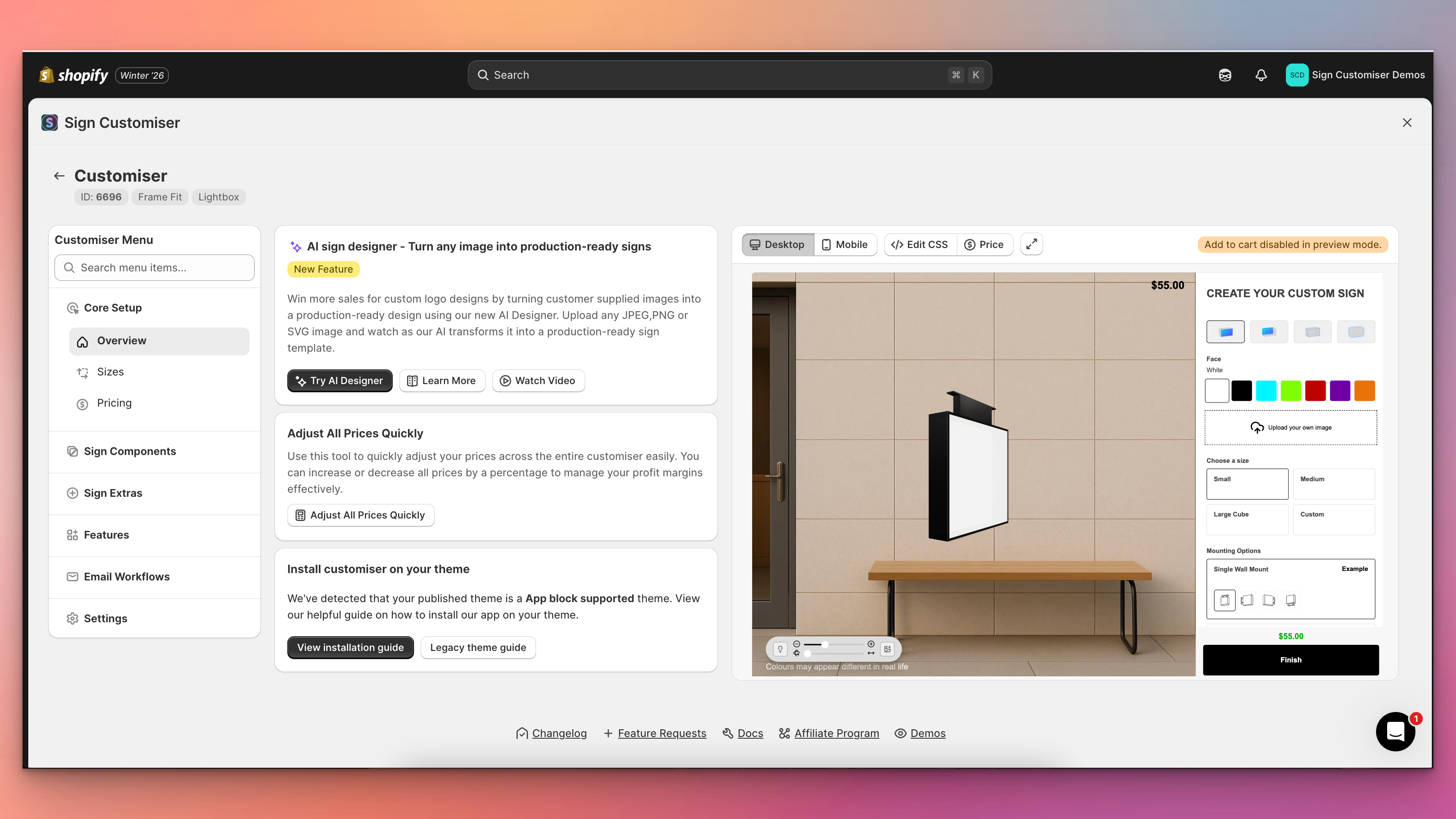
Sign Customiser’s admin experience has been transformed with a brand new three-column layout that puts your live customiser preview front and centre. You can now see exactly how your changes look in real-time without navigating away from your settings, making it faster and easier than ever to perfect your sign customiser.
What’s Changed
- Live preview panel - A persistent preview of your customiser now appears alongside your settings, automatically updating when you save changes to colours, fonts, sizes, materials, and other options
- Three-column layout - The new layout provides a collapsible navigation menu on the left, your current settings in the centre, and the live preview on the right for an efficient workflow
- Fullscreen preview mode - Click the expand button to view your customiser in a fullscreen modal for detailed inspection, with desktop and mobile view options
- Collapsible navigation - Menu sections can now be collapsed to focus on the areas you’re working with, and includes a quick search to jump directly to any setting
- Automatic preview refresh - Changes saved to forms, tables, and settings now automatically trigger a preview refresh, eliminating the need to manually reload
- Desktop and mobile preview switching - Easily toggle between desktop and mobile views directly from the preview controls bar to test your customiser on different devices
-
Improved Email Threading for Form Submissions
Sign Customiser now makes it easier to manage customer enquiries by including the customer’s email address in the sender name for custom design form submissions. This simple improvement helps you quickly identify who sent each request directly from your inbox without opening the email.
What’s Changed
- Customer email in sender name - Form submission emails now show the customer’s email address in the From field (e.g., “[email protected] via Sign Customiser”), making it easier to identify messages at a glance
- Better email organisation - Email clients can now group related conversations more effectively, helping you keep track of ongoing customer discussions
- Improved CRM compatibility - CRM systems that parse incoming emails can now more easily identify and associate leads with the correct contact record, streamlining your sales workflow
-
Add thumbnail images to selection buttons
Sign Customiser now lets you add thumbnail images to your selection buttons, making it easier for customers to visually identify different options at a glance. This works for materials (letter finishes), mountings, and backboard selections.
What’s Changed
- Button images for selections - Upload images that display directly on the selection buttons in the customiser sidebar
- Click to enlarge - Customers can click on button images to view them in a larger modal
- Easy management - Upload and manage button images from the material, mounting, or support editing screens in the admin
- Separate from popup images - Button images are distinct from the existing popup/example images that appear when customers click the info icon
-
Earn credits by referring other sign businesses
Know another sign business that could use Sign Customiser? Now you can both earn credits when they join. Share your personal referral link with fellow sign makers—when they subscribe, you get 10 bonus credits. When they make their first credit purchase, you both get 50% bonus credits on top.
What’s Changed
- Earn credits for referrals – Get 10 credits when someone you refer subscribes to Sign Customiser, plus 50% bonus credits when they make their first purchase
- Both parties benefit – Referred businesses also receive 50% bonus credits on their first credit purchase, so there’s something in it for everyone
- Share however works for you – Copy your unique referral link, share your code directly, or send email invitations straight from your dashboard
- 90-day tracking – Your referral link stays active for 90 days, so contacts who sign up later still count as your referral
- No pressure timing – Referred businesses can apply a referral code any time before they subscribe, giving them flexibility to explore first
-
Step-by-step undo for text and AI Sign Designer Custom Logos
Sign Customiser now gives your customers the power to undo their design changes step by step. Whether they’re adjusting text positions, changing colours, or fine-tuning AI Sign Designer Custom Logos, every edit is tracked and can be reversed with a single click.
What’s Changed
- Step-by-step undo button - A new undo button in the control bar lets customers reverse their most recent change, whether it’s moving text, adjusting a logo, or changing colours
- Full history tracking - Up to 50 design states are stored, allowing customers to step back through multiple changes if they take a wrong turn during customisation
- Works across all elements - Undo support covers text elements, AI Sign Designer Custom Logos, position adjustments, colour changes, and font selections
- Persistent across sessions - When local cache is enabled, the undo history is preserved even if the customer refreshes the page or returns later
