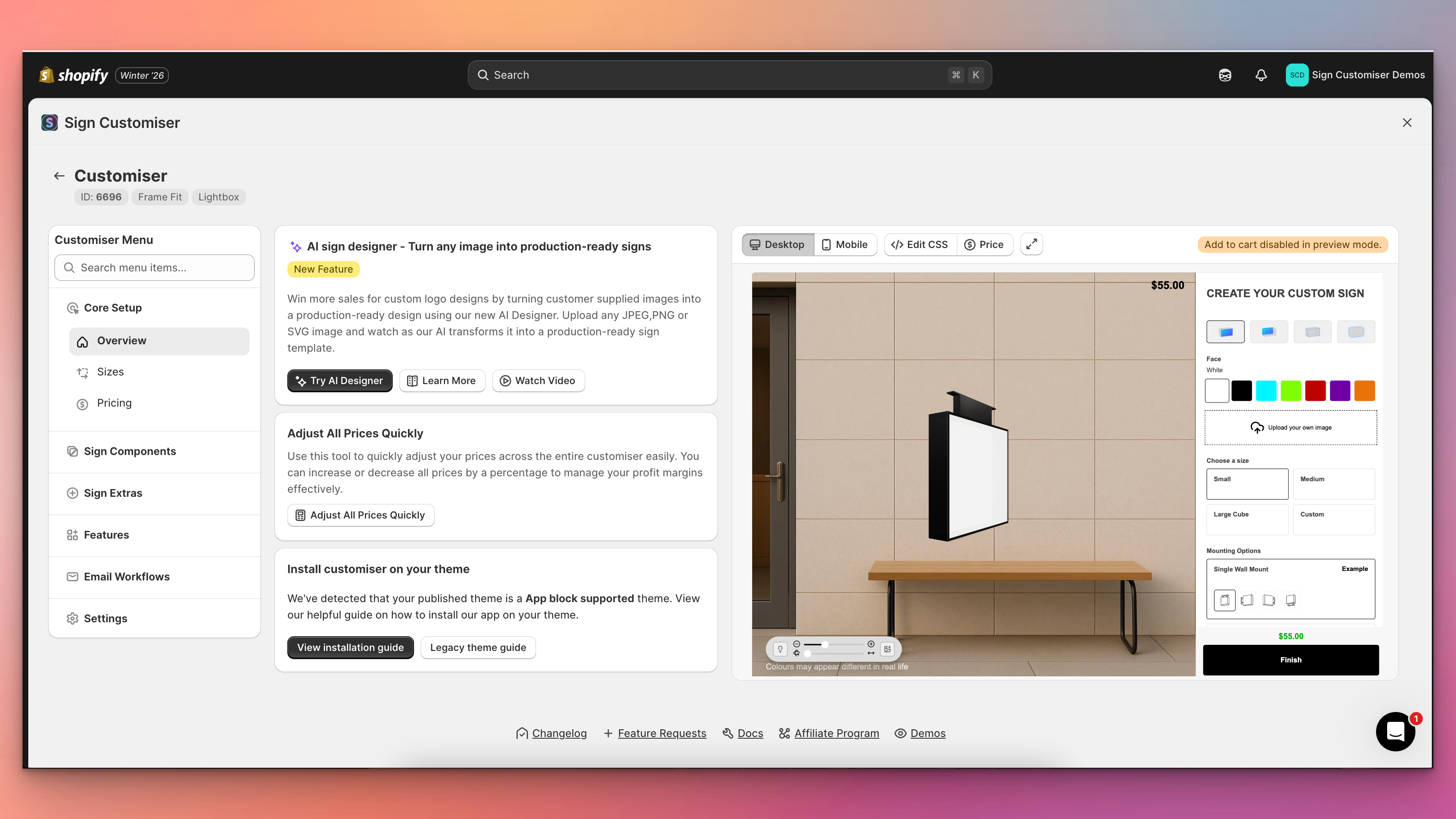
Sign Customiser’s admin experience has been transformed with a brand new three-column layout that puts your live customiser preview front and centre. You can now see exactly how your changes look in real-time without navigating away from your settings, making it faster and easier than ever to perfect your sign customiser.
What’s Changed
- Live preview panel - A persistent preview of your customiser now appears alongside your settings, automatically updating when you save changes to colours, fonts, sizes, materials, and other options
- Three-column layout - The new layout provides a collapsible navigation menu on the left, your current settings in the centre, and the live preview on the right for an efficient workflow
- Fullscreen preview mode - Click the expand button to view your customiser in a fullscreen modal for detailed inspection, with desktop and mobile view options
- Collapsible navigation - Menu sections can now be collapsed to focus on the areas you’re working with, and includes a quick search to jump directly to any setting
- Automatic preview refresh - Changes saved to forms, tables, and settings now automatically trigger a preview refresh, eliminating the need to manually reload
- Desktop and mobile preview switching - Easily toggle between desktop and mobile views directly from the preview controls bar to test your customiser on different devices