Sign Customiser now lets you add clickable links inside the descriptions and help text that customers read while they’re designing their sign. Point customers at a mounting guide, installation video, size chart, or a “contact us” link without ever taking them out of the flow, all using a simple Markdown link format your merchants will already recognise.
This is a small quality-of-life upgrade that unlocks a lot: fewer support questions, better-informed buyers, and a cleaner way to surface the helpful content you already have on your store.
What’s Changed
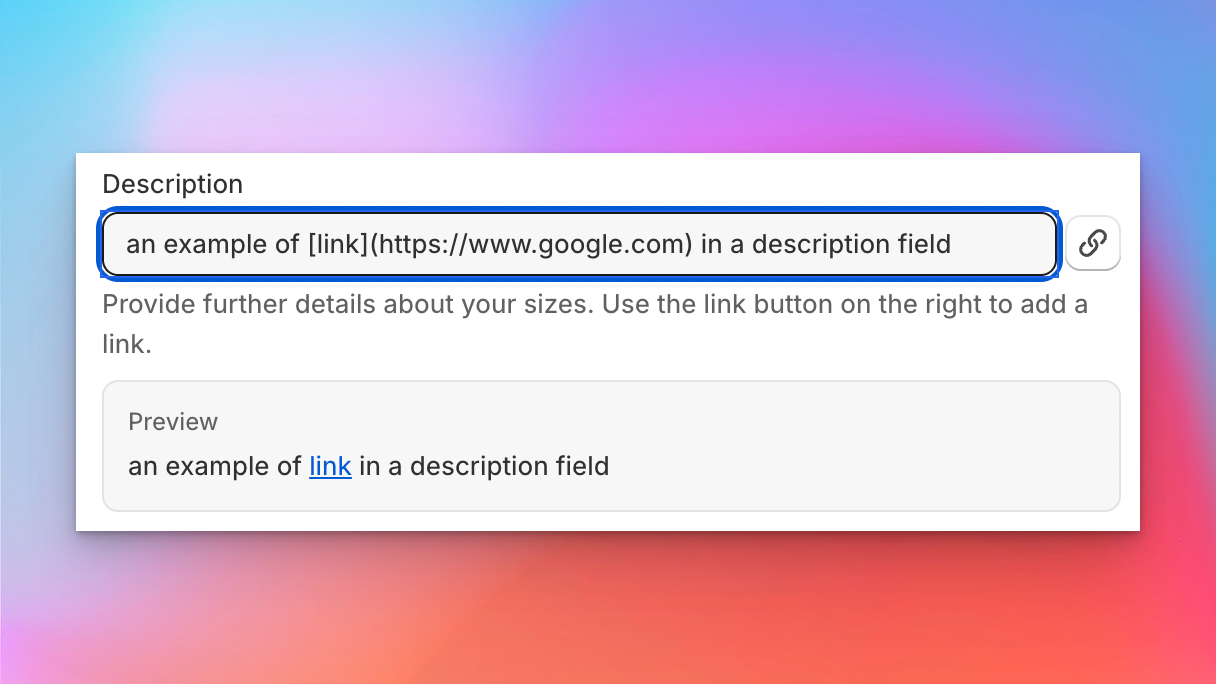
- Markdown links in option descriptions - Use
[label](url)inside descriptions for colours, sizes, materials, mounting, supports, jackets, product types, and custom form fields to turn any word or phrase into a link - Links render safely for customers - Customer-facing descriptions automatically become clickable, opening external links in a new tab and keeping internal or anchor links in the same tab
- Supports the link types you actually use - Works with full URLs, your own store paths like
/pages/mounting-guide, in-page anchors,mailto:email links, andtel:phone links - Inline admin hint - Every supported field now shows a short help note with example syntax, so merchants can see at a glance how to add a link without leaving the form
- Plain text still works as before - Existing descriptions keep rendering exactly as they do today, so there’s nothing to migrate