
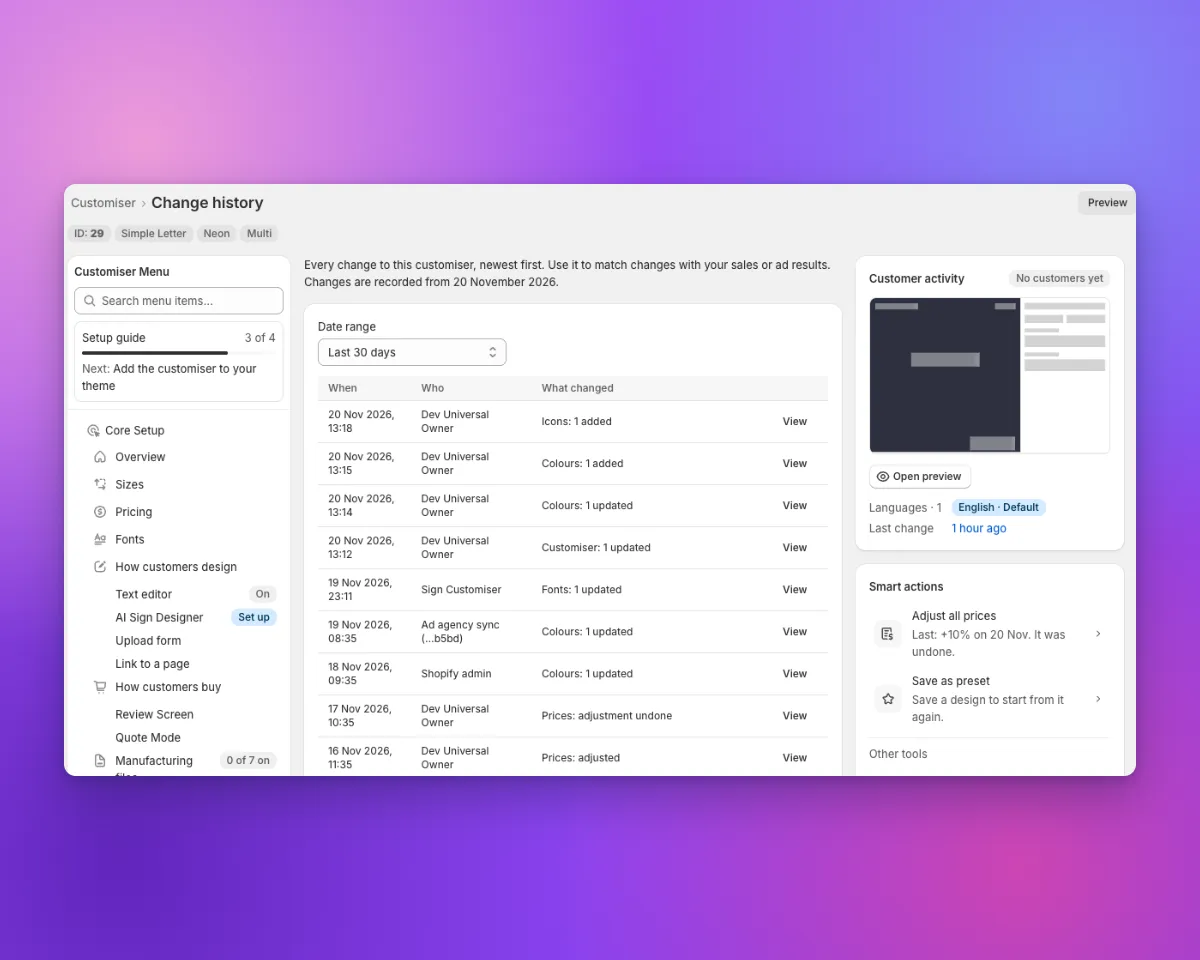
Each customiser now has a Change history page. It shows the changes for the period that you select, newest first: when each change occurred, who made it and what changed.
Use it for two tasks:
- Find the change that moved your results. When your sales or your cart-to-order rate on the Overview change, find the price, option and setting changes on the same days. Compare them with the dates of your ad changes in your ad account, so that you know which changes occurred together.
- Know who changed what, and when. When many people edit your customisers, or an agency or integration uses one of your Store’s API keys, each change shows who made it. You can find who changed a price, a name or a setting, and when.
What’s Changed
- Open it from the OverviewOn the customiser Overview, in the Customer activity card, click the time beside Last change, for example “2 days ago”.
- Last 7, 30 or 90 daysSelect the period in Date range.
- Who made each changeA Store member shows by name. An API key from your Store shows by its name and its last four characters. A change from the Shopify admin shows as Shopify admin. A change from our support team or from a Sign Customiser update shows as Sign Customiser.
- What changedEach row shows the areas and the number of changes, for example “Colours: 3 updated, 1 added”. Click View to see each changed item. For prices, names and on/off settings, you also see the value before and after the change. Other changes show as a count.
- One row for each saveA price list update, an Adjust all prices change, its undo, a Convert currency change and a new option order each show as one row.
- History starts on 20 November 2026Changes before this date were not recorded.
