NewTurn any image into a sign design.
Changelog

Changelog

Documenting our journey of creating a custom sign builder.

Filtered by:feature(182 updates)Page 9 of 19

Stay informed with updates every month

Or subscribe to ourRSS feed

Jan 22, 2026

2026.1

Add thumbnail images to selection buttons

Sign Customiser now lets you add thumbnail images to your selection buttons, making it easier for customers to visually identify different options at a glance. This works for materials (letter finishes), mountings, and backboard selections.

What’s Changed

  • Button images for selectionsUpload images that display directly on the selection buttons in the customiser sidebar
  • Click to enlargeCustomers can click on button images to view them in a larger modal
  • Easy managementUpload and manage button images from the material, mounting, or support editing screens in the admin
  • Separate from popup imagesButton images are distinct from the existing popup/example images that appear when customers click the info icon
Jan 22, 2026

2026.1

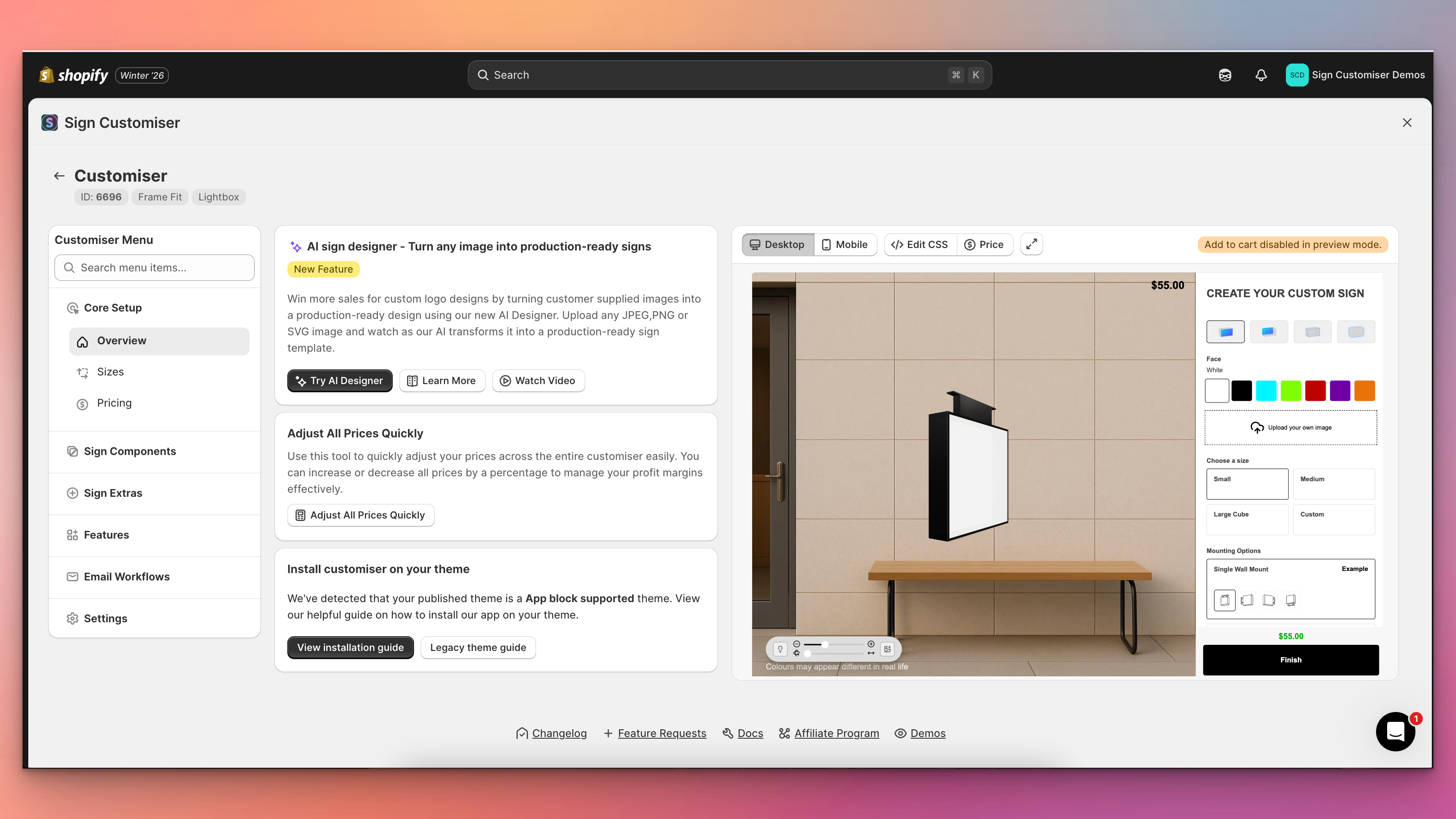
Redesigned customiser admin with live preview

Sign Customiser’s admin experience has been transformed with a brand new three-column layout that puts your live customiser preview front and centre. You can now see exactly how your changes look in real-time without navigating away from your settings, making it faster and easier than ever to perfect your sign customiser.

Redesigned customiser admin with live preview

What’s Changed

  • Live preview panelA persistent preview of your customiser now appears alongside your settings, automatically updating when you save changes to colours, fonts, sizes, materials, and other options
  • Three-column layoutThe new layout provides a collapsible navigation menu on the left, your current settings in the centre, and the live preview on the right for an efficient workflow
  • Fullscreen preview modeClick the expand button to view your customiser in a fullscreen modal for detailed inspection, with desktop and mobile view options
  • Collapsible navigationMenu sections can now be collapsed to focus on the areas you’re working with, and includes a quick search to jump directly to any setting
  • Automatic preview refreshChanges saved to forms, tables, and settings now automatically trigger a preview refresh, eliminating the need to manually reload
  • Desktop and mobile preview switchingEasily toggle between desktop and mobile views directly from the preview controls bar to test your customiser on different devices

Jan 22, 2026

2026.1

Improved Email Threading for Form Submissions

Sign Customiser now makes it easier to manage customer enquiries by including the customer’s email address in the sender name for custom design form submissions. This simple improvement helps you quickly identify who sent each request directly from your inbox without opening the email.

What’s Changed

  • Customer email in sender nameForm submission emails now show the customer’s email address in the From field (e.g., “[email protected] via Sign Customiser”), making it easier to identify messages at a glance
  • Better email organisationEmail clients can now group related conversations more effectively, helping you keep track of ongoing customer discussions
  • Improved CRM compatibilityCRM systems that parse incoming emails can now more easily identify and associate leads with the correct contact record, streamlining your sales workflow

Jan 19, 2026

2026.1

Earn AI purchased credits by referring other sign businesses

Know another sign business that could use Sign Customiser? Refer that business to earn AI purchased credits. When the referred Store subscribes after applying your code, you get 10 AI purchased credits. On its first qualifying AI credit purchase, you both get a 50% AI purchased credit bonus.

What changed

  • Earn AI purchased credits for referrals. Get 10 AI purchased credits when a referred Store subscribes after applying your code. You can also get a 50% AI purchased credit bonus on its first qualifying AI credit purchase.
  • Both Stores get a bonus. The referred Store also gets a 50% AI purchased credit bonus on its first qualifying AI credit purchase.
  • Share the referral. Copy your referral link, share your code, or send an email invitation from your admin.
  • 90-day referral cookie. After someone opens your referral link, Sign Customiser remembers your code for 90 days. If they sign up during this period, the code is saved for them to apply.
  • Apply the code before purchase. The referred Store must apply your code before its first qualifying AI credit purchase.

Jan 11, 2026

2026.1

Step-by-step undo for text and AI Sign Designer Custom Logos

Sign Customiser now gives your customers the power to undo their design changes step by step. Whether they’re adjusting text positions, changing colours, or fine-tuning AI Sign Designer Custom Logos, every edit is tracked and can be reversed with a single click.

What’s Changed

  • Step-by-step undo buttonA new undo button in the control bar lets customers reverse their most recent change, whether it’s moving text, adjusting a logo, or changing colours
  • Full history trackingUp to 50 design states are stored, allowing customers to step back through multiple changes if they take a wrong turn during customisation
  • Works across all elementsUndo support covers text elements, AI Sign Designer Custom Logos, position adjustments, colour changes, and font selections
  • Persistent across sessionsWhen local cache is enabled, the undo history is preserved even if the customer refreshes the page or returns later

Jan 11, 2026

2026.1

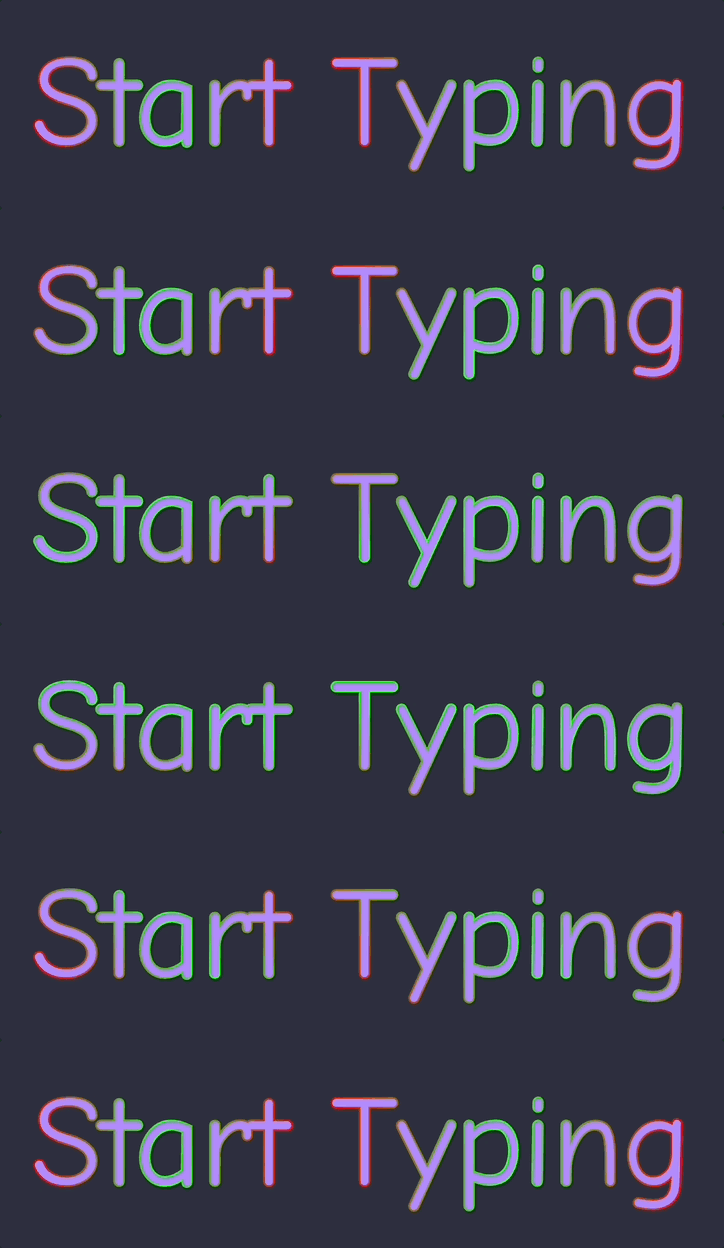
Flow RGB animated outline effect

Sign Customiser’s Flow RGB effect has been completely redesigned. Instead of filling the entire shape with animated colours, the effect now animates along the outline of your text and logo designs. This creates a more realistic neon tube simulation and unlocks the ability to use Flow RGB alongside a face colour for the first time.

Flow RGB animated outline effect

What’s Changed

  • Animated outline effectThe Flow RGB colours now cycle smoothly along the stroke/outline of text and SVG shapes, creating a realistic flowing neon tube appearance
  • Works with UV coloursYou can now combine Flow RGB with a solid UV colour, where the animated gradient appears as an outline around the filled shape
  • AI sign design supportAI sign designs now display the same animated outline effect with thicker, more visible strokes optimised for complex shapes

Jan 7, 2026

2026.1

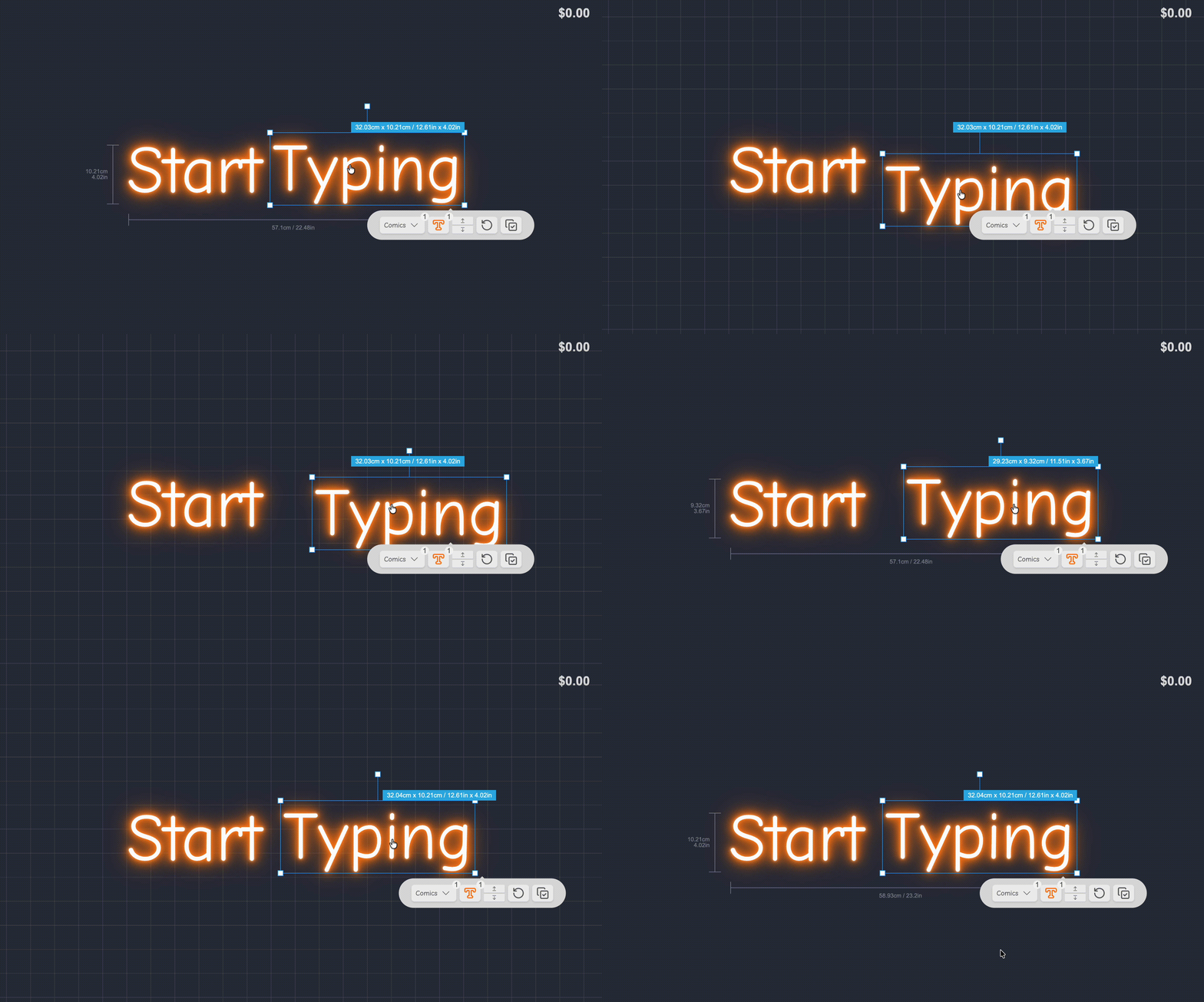
Snap to grid for precise sign alignment

Help your customers create perfectly aligned sign designs with the new snap to grid feature. When enabled, dragging sign parts will snap them to a 20px grid, making it easier to position words, icons, and other elements with precision.

Snap to grid demo

What’s Changed

  • Grid snappingAll draggable sign elements now snap to a 20px grid when this feature is enabled, ensuring consistent spacing and alignment across designs.
  • Easier alignmentCustomers can create professional-looking layouts without the frustration of trying to manually align elements by eye.

How to Enable

Navigate to your customiser settings page to enable snap to grid for your store.

Jan 6, 2026

2026.1

Enter measurements in inches and pounds

You can select centimetres or inches for dimensions in the Sign Customiser merchant admin. You can select kilograms or pounds for weights.

How to enable

Follow the steps in the admin measurement units guide.

Storage update (September 2026)

Your Store unit settings control the units you use in the merchant admin. The customer customiser has separate unit settings.

This update adds inch and pound values beside metric values in existing settings. The merchant admin still converts new size entries to centimetres when you save them. Some older settings show a value converted from the metric figure first saved. Read the inch and pound figures update for details.

Dec 29, 2025

2025.12

Rotation data now included in order details

Sign Customiser now includes rotation information directly in your order details. When customers rotate individual letters or elements in their custom sign designs, those rotation angles are captured and displayed alongside other manufacturing specifications, eliminating guesswork during production.

What’s Changed

  • Rotation angles in product descriptionsWhen a sign element has been rotated, the exact degree of rotation is now displayed in the order details alongside dimensions and other specifications
  • Customisable rotation labelMerchants can customise the “Rotation” label text through the Labels settings to match their preferred terminology
  • Accurate manufacturing dataRotation values are shown with degree precision, ensuring your production team has the exact orientation for each element

Dec 24, 2025

2025.12

Enhanced visualiser controls and navigation

Sign Customiser’s visualiser now offers more intuitive ways to explore and perfect your sign designs. Whether you’re positioning your sign against a background image or getting a closer look at fine details, these new controls put you in the driver’s seat.

What’s Changed

  • Pan and zoom supportDrag the visualiser stage around and zoom in or out to get the perfect view of your design. This is particularly useful when positioning signs against background images for realistic previews.
  • Unified control barThe light, background, and share controls are now consolidated into a single convenient control bar. Merchants can enable this by updating their Control Location settings in the admin.
  • Improved custom shape backboard interactionCustom shape backboards can now be dragged within their defined content area without accidentally resizing the backboard itself, giving you more precise control over sign placement.

Open original

Get started

Add Sign Customiserto your store today

Install now
36+ verified reviews

Login

Universal Sign In
  • WordPress
  • Wix
  • Etsy
  • Squarespace
  • Webflow

Or, if on Shopify, navigate to your store admin to login.