NewTurn any image into a sign design.
Changelog

Changelog

Documenting our journey of creating a custom sign builder.

Filtered by:feature(182 updates)Page 4 of 19

Stay informed with updates every month

Or subscribe to ourRSS feed

Jul 22, 2026

2026.7

Stencil signs refined for manufacturing

We’ve refined Sign Customiser’s stencil sign around the details that matter when a sheet reaches production. The live preview now separates the usable design area from the overspray border, measures the true letter height of every line and keeps the finished sheet size visible. Pricing and eligible production files use those same bordered dimensions.
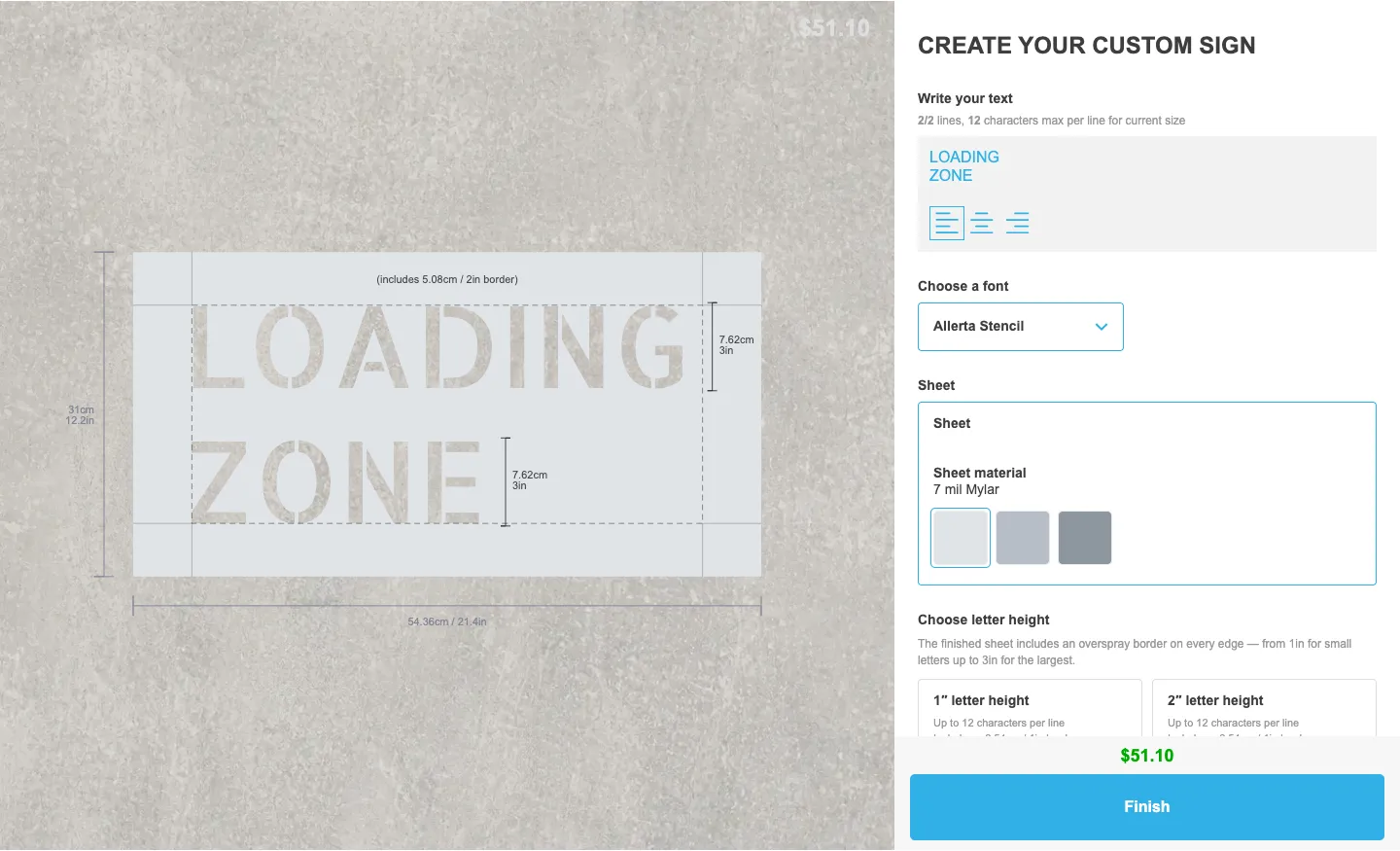
Stencil sign customiser showing a two-line LOADING ZONE design, a 2 inch border zone, per-line 3 inch letter-height guides and finished sheet measurements

What’s Changed

  • One clear border allowanceRectangular stencil sheets use the configured overspray border as the single source of padding around the design. A dashed guide marks where the usable design area ends, and the included demo uses a 1 inch border for 1 to 2 inch letters, 2 inches for 3 to 7 inch letters and 3 inches for 8 to 12 inch letters.
  • Letter height means the letters themselvesSizing follows the visible glyph height instead of counting the full line box or the gap between lines. Every text line gets its own on-canvas height guide, so a 3 inch choice produces 3 inch letters on each line.
  • Separate finished-sheet measurementsOverall width and height rails sit outside the sheet and include the full border. Customers can see the size you will manufacture without confusing it with the letter-height guides inside the design.
  • One size from quote to cutThe live price, product image, order details and manufacturer handoff agree on the bordered sheet size. Compatible text-only designs carry the same physical dimensions into calibrated SVG and optional DXF files.
  • A complete demo in one clickMerchants can install a ready-made stencil customiser with 12 letter-height tiers, tiered borders, three Mylar materials, four stencil-safe fonts, exact-height controls and production file settings already configured.
Jul 22, 2026

2026.7

Stable custom CSS hooks across the customer customiser

Sign Customiser now gives merchants a stable CSS class for each part of the customer customiser. Existing custom CSS can target controls and states more precisely, without relying on generated class names that may change after an update.

What’s Changed

  • More complete CSS coverageStable classes now cover the customiser’s controls, forms, pricing details, previews, loading states and other visible elements
  • Reliable pop-up stylingModals, tooltips and popovers have dedicated classes, including elements that render outside the main customiser container
  • Predictable state selectorsSelected, open, active, disabled and error states use consistent class names where those states are available
  • Embed wrapper controlsShopify theme embeds and website integration wrappers now expose stable classes for their containers, loading screens, modals and validation messages
  • Safer saved CSSSign Customiser now handles merchant CSS and customiser setup data more safely when loading embedded, hosted and preview customisers

Jul 22, 2026

2026.7

Public API v2 migration guide and deprecation timeline

Sign Customiser’s previous-generation public API is now deprecated. Existing integrations continue to work, but developers should move to API v3 before the scheduled 22 January 2027 Sunset.

The new v2 to v3 migration guide maps every previous-generation operation to its v3 replacement. It also covers scoped Store-bound keys, pricing field changes, webhook subscriptions, order and product writes, error handling, pagination, and a safe cutover sequence that avoids duplicate writes.

Deprecated responses now include standard Deprecation, Sunset, and Link headers. These make the timeline and migration guide visible to API clients without changing existing response bodies, status codes, validation, or authentication behaviour.

Jul 22, 2026

2026.7

Braille signs built for international production

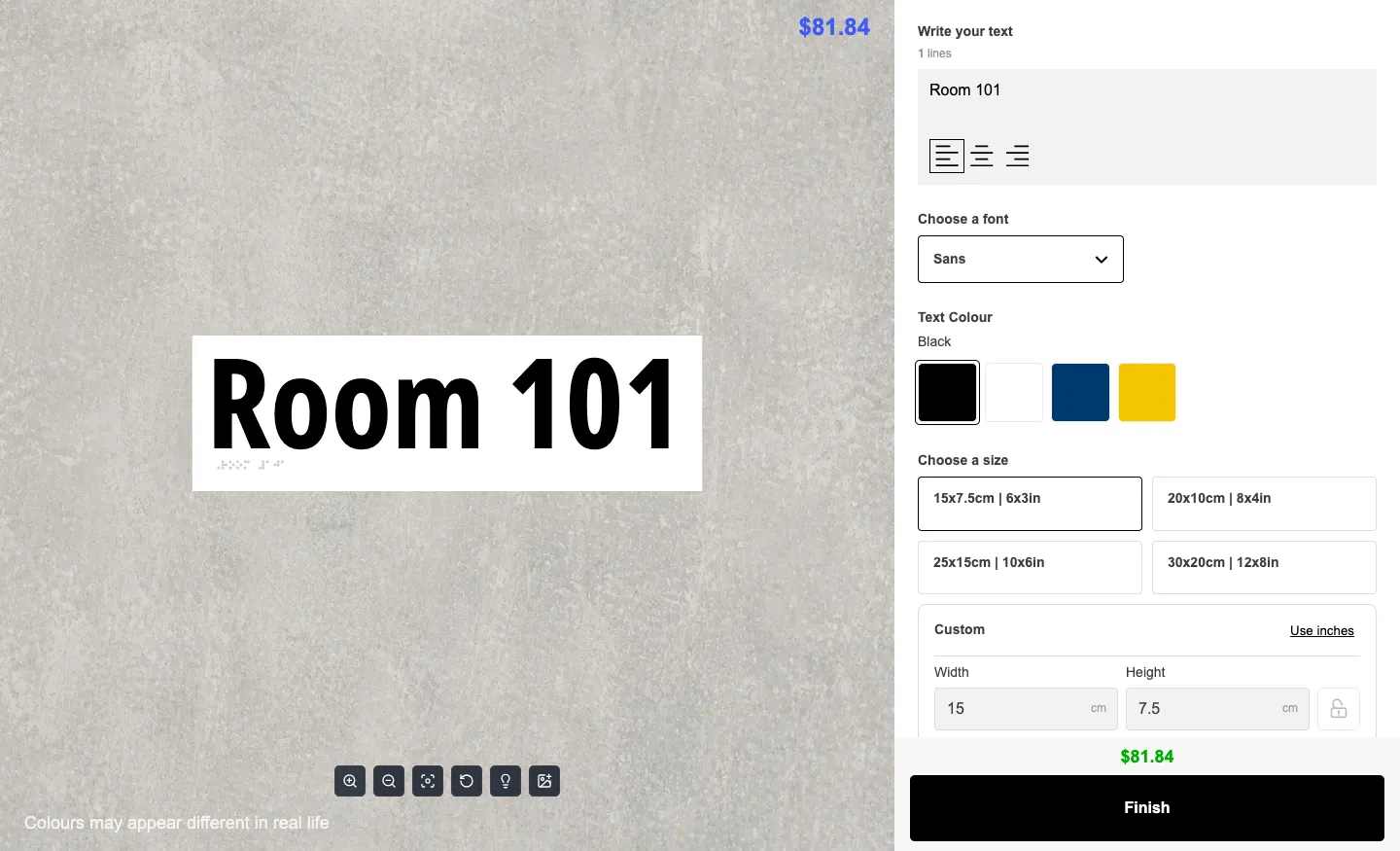
Since launching Braille Signs, we’ve connected the customer preview, merchant settings and production handoff in one product. Customers see the Braille translation on the sign as they type, while merchants choose the translation, appearance and quote behaviour. Sign Customiser carries the verified Braille data into every order and production file.

Braille sign customiser showing Room 101 with a translated Braille dot row, plate sizes and colour controls

What’s Changed

  • International Braille support. Sign Customiser includes 14 translation tables for 13 languages. It chooses a starting table and dot geometry from the merchant’s store country, with manual table selection for projects that need it. Tables that need human proofing say so clearly, and unsupported wording can follow the custom quote path.
  • Braille shown on the sign. The translated row appears beneath the tactile wording in the live preview. ADA, AS/NZS 1428.4.2 and Marburg Medium geometry presets keep the dots at their physical size when the plate changes. Customers also see when translation is in progress, when it needs another try or when the selected plate is too small.
  • Merchant controls in one place. A dedicated Braille settings page lets merchants choose automatic translation or a specific table, use the plate or text colour for the dots and control whether untranslatable wording opens the quote prompt. Translation status, retry, fixed-size and quote messages remain editable for each customiser.
  • The same data reaches production. Sign Customiser keeps the source wording, Braille string, table, grade and geometry with the product image, order details and manufacturer email. It checks the translation again at checkout, while SVG, EPS and Illustrator-compatible files place every dot as an exact vector circle.
  • One-click demo setup. Merchants can install a ready-made Braille Sign Customiser with Frame Fit pricing, four plate sizes, tactile text styles, colours, plate materials, mountings and customer labels already configured.

Jul 17, 2026

2026.7

Sell in multiple languages from one customiser

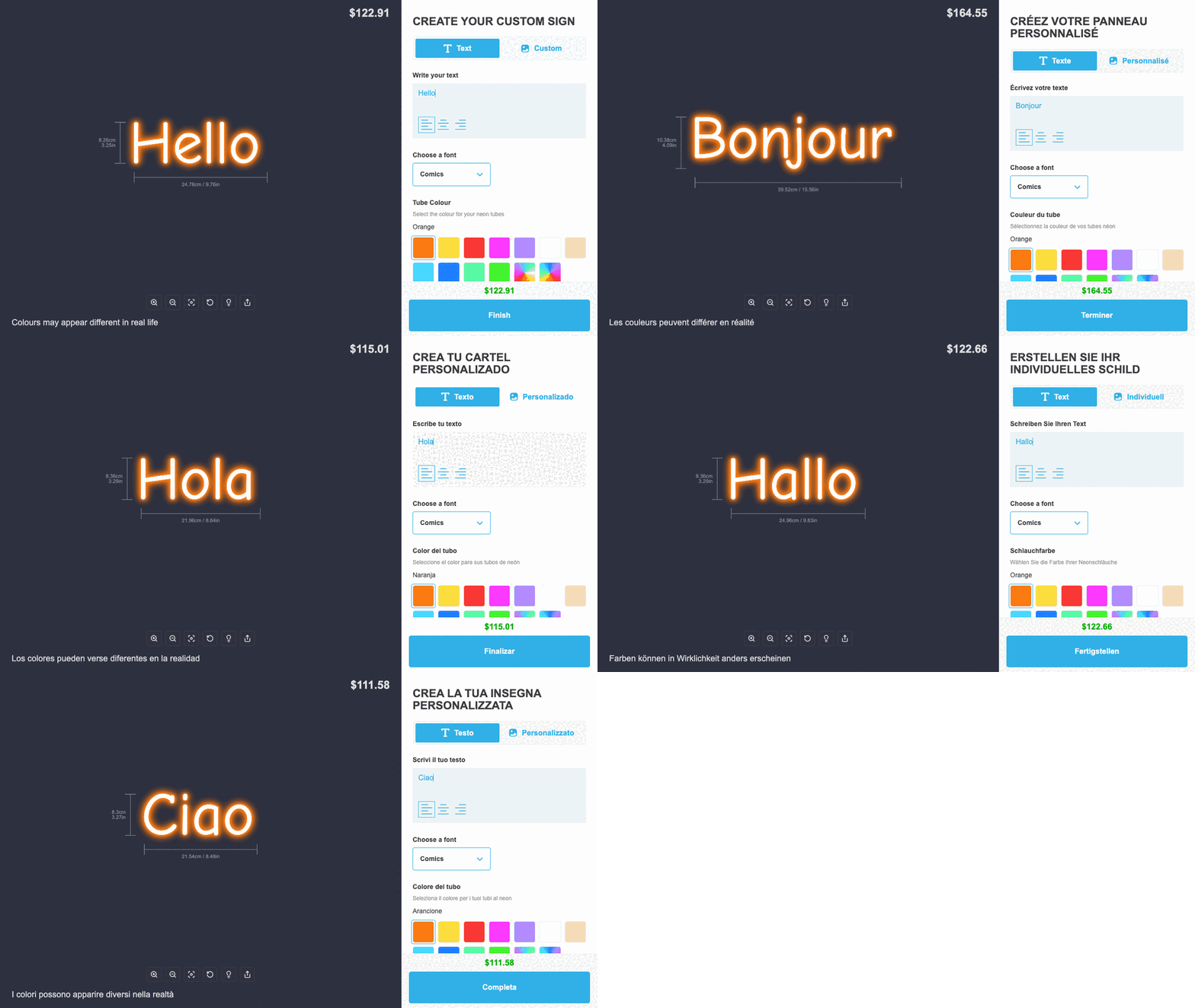
One customiser can now serve shoppers in multiple languages. Add translations yourself or use AI to prepare a first draft, check each language in the live preview, and publish it when you are happy with the result.

The same Neon customiser switching between English, French, Spanish, German and Italian

Use AI to prepare first draft. Choose the source and target language and Sign Customiser fills the draft catalogue for you. The result stays private until you review it in the live customiser preview and choose to publish.

This is not a Shopify-only feature. The same published languages work across Universal customiser links, iframe embeds and supported custom element integrations. Universal sites can select a language explicitly, follow the site’s chosen language or use the shopper’s browser language before falling back to the customiser default. See how language selection works on Shopify and Universal, including the language_code URL parameter and language-code custom element attribute.

What’s Changed

  • One customiser for every languageAdd and manage languages without duplicating customisers or swapping template IDs for each market.
  • Automatic language matching across Shopify and UniversalShopify customisers follow the shopper’s active storefront language. Universal customiser links and embeds can use an explicit language, the site’s chosen language or the shopper’s browser language, with a safe fallback to your default.
  • Manual or AI-assisted translationStart with blank fields or ask AI to prepare a first draft. AI translations stay in draft until you review and publish them, and your manual edits remain protected.
  • Private drafts and live previewsWork on a translation without changing the public customiser, then preview the real shopping experience before publishing.
  • Full customiser interface coverageTranslate buttons, option names, choice labels, custom forms, warnings, review details, and other text within the customer customiser.
  • Clear missing and stale translation noticesSee what still needs attention and find wording that may need another look after you change the source language.
  • Translated order details stay readableSign Customiser keeps the labels and choices the shopper saw with the product and order, while preserving the underlying details used for pricing and production.

Jul 15, 2026

2026.7

Custom sizes now open in your shopper's local units

Sign Customiser now opens custom-size inputs in the measurement system that matches a shopper’s active Shopify market. Shoppers in imperial markets see inches first, while shoppers in metric markets see centimetres first, making it easier to enter the dimensions they know.

What’s Changed

  • Local units appear firstCustomisers that offer both units now start with inches for imperial markets and centimetres for metric markets.
  • No merchant setup requiredSign Customiser uses the shopper’s active Shopify market automatically, including when a shopper changes country on the storefront.
  • Both units stay availableShoppers can still switch units whenever they need to, and customisers set to a single unit continue to use that unit.
  • Existing size details stay consistentWherever dimensions already display both inches and centimetres, such as reviews and visualiser measurements, they continue to show both.

Jul 15, 2026

2026.7

Choose how your customiser works on mobile

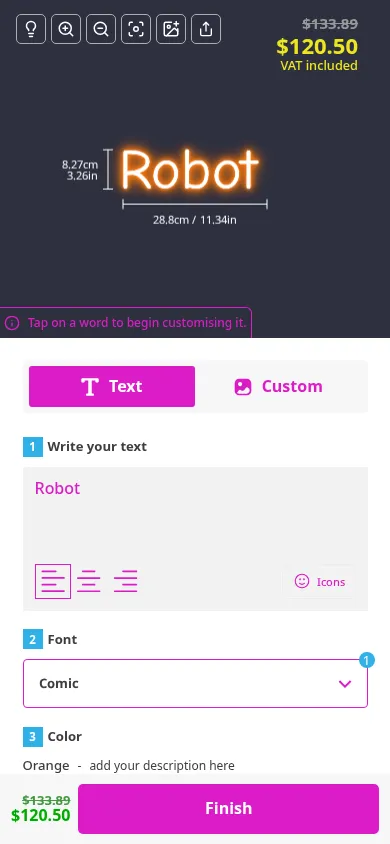
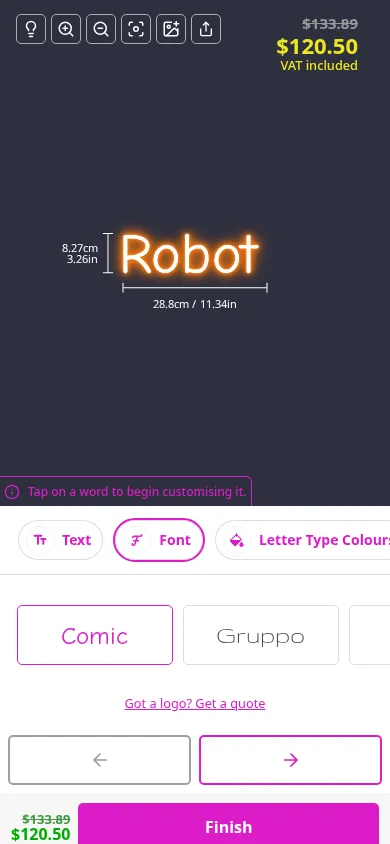
Every Sign Customiser customiser can now use either mobile layout. Choose Stacked all at once when you want shoppers to scroll through their options, or One Selection at a Time when you want to guide them through each choice with a focused step-by-step flow.

Robot neon sign customiser in the Stacked all at once mobile layout, showing text, font and colour controls with a $120.50 price in the upper-right visualiserRobot neon sign customiser in the One Selection at a Time mobile layout, showing pill navigation and a $120.50 price in the upper-right visualiser

What’s Changed

  • Two layouts for every customiserChoose either mobile view from Mobile View in your customiser settings. The choice is no longer limited to older customisers.
  • Stacked all at onceShoppers can browse and compare every available choice in one scrolling page.
  • One Selection at a TimeShoppers move through a simpler step-by-step flow, with pill navigation to revisit any choice.
  • Clearer option iconsColour choices now use the colour icon, and the pill icons have been aligned more cleanly within their circular buttons.

Jul 15, 2026

2026.7

Better automatic sizing for Advanced customisers

Advanced customisers now make the difference between automatic and manual sizing clear. Signs follow the customer’s text by default. A chosen manual size remains in place as they edit the design, and the familiar size lock lets them return to content-driven sizing with one click.

What’s Changed

  • One-click return to automatic widthClicking the locked size control resizes the sign to its current content and keeps following later text or font changes
  • Stable manual sizingAdjusting the slider, width or height keeps the padlock open and preserves that size while the customer changes text, fonts or orientation
  • Explicit lockingThe padlock closes only when the customer clicks it
  • Familiar placementThe size control stays beside the width and height inputs, where customers already expect to find it
  • Frame Fit stays familiarFrame Fit customisers keep their existing size lock because it still represents the fixed box customers expect

Jul 14, 2026

2026.7

Stencil signs now start with letter height

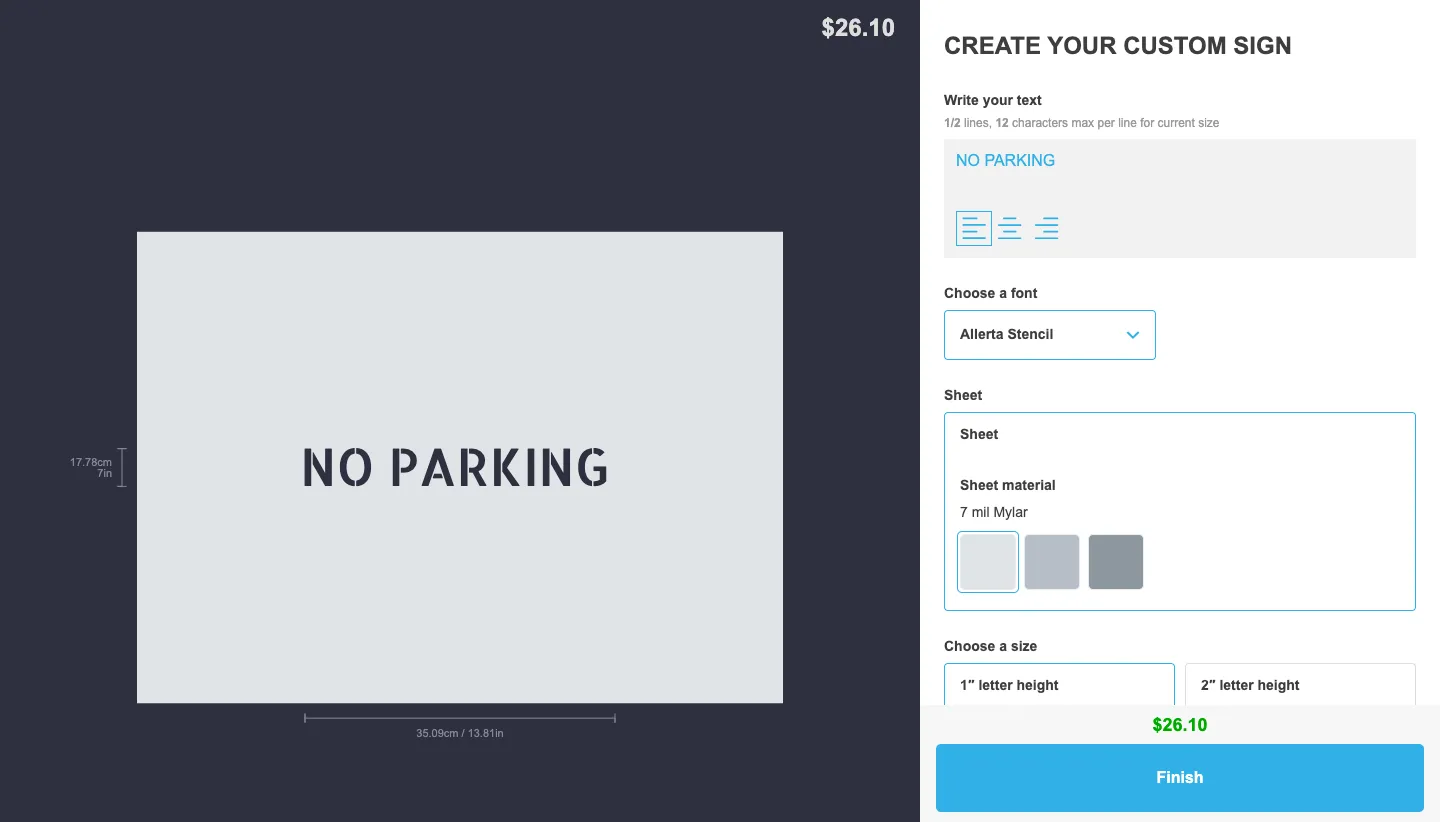
Sign Customiser now has a dedicated stencil signs page and live demo. Customers choose letter height first, then see the finished bordered sheet size and price update as their text changes.

Live stencil customiser showing NO PARKING at 1 inch letter height

What’s Changed

  • Letter height comes first. Customers choose a preset tier, then see the finished sheet update as they edit the text. When enabled, an Exact letter height input sits alongside the tiers.
  • Finished sheet size stays visible. The dimensions include the border around the cut lettering, alongside the live price.
  • Eligible text designs get cut-ready SVGs. Eligible text-only designs emit physically calibrated flat-path SVGs. Uploaded or masked artwork may use fallback SVG geometry.
  • DXF is optional. It is merchant-enabled, available only for eligible flat text-only stencil SVGs. Conversion can fail, so an order may have no DXF.
  • Starter stencil fonts keep their bridges. Fonts not marked stencil-safe show a warning so they can be reviewed before production.

Jul 13, 2026

2026.7

Braille signs

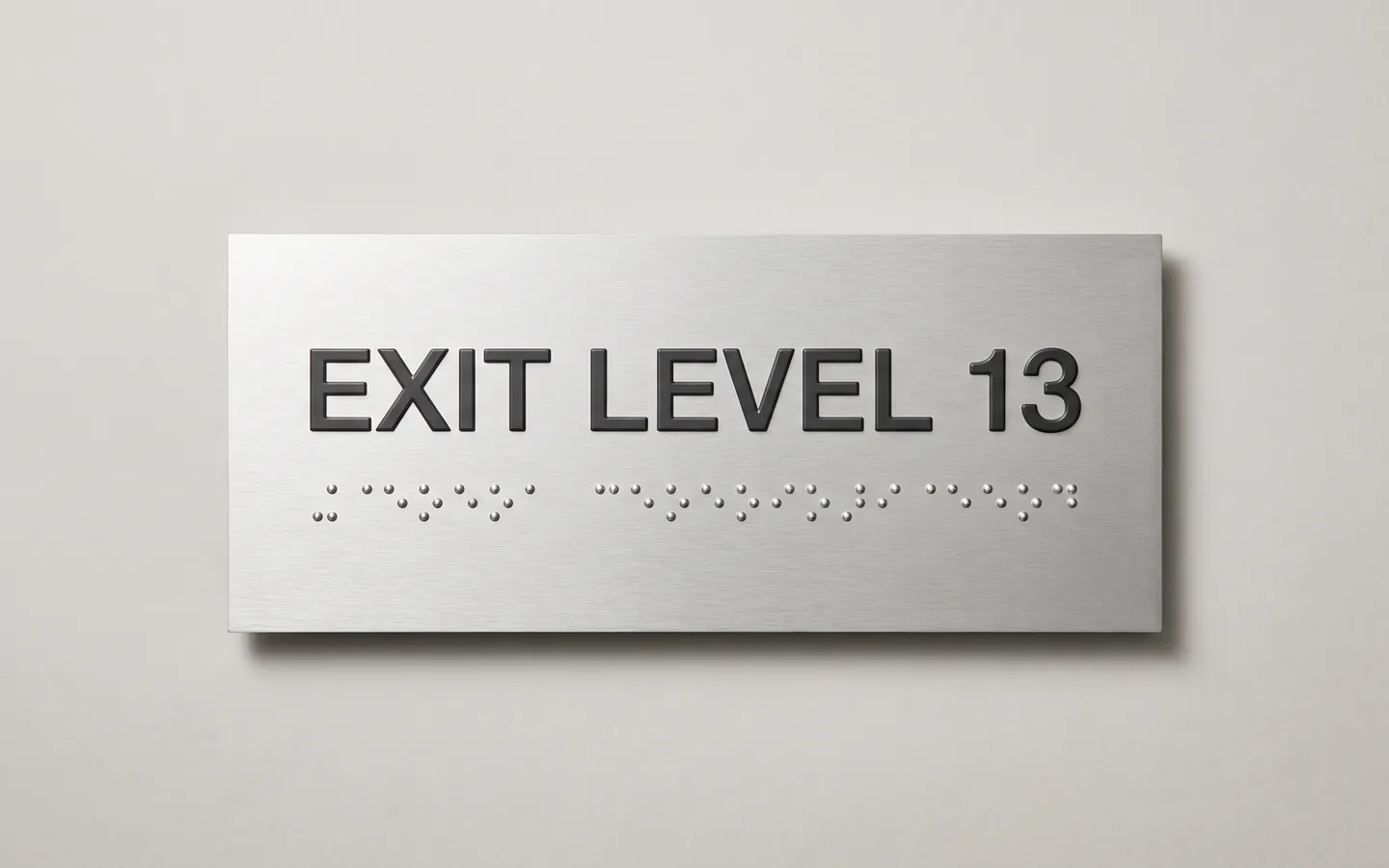
Sign Customiser now supports Braille Signs, a new plate-style product type for merchants selling accessibility and wayfinding signage. Customers type the printed wording, see a live braille row appear underneath it, and the same braille data flows through checkout, product images, manufacturer emails, and production files.

Braille sign customiser preview showing printed wording with a generated braille dot row on a plate

What’s Changed

  • New Braille Signs product typePick “Braille Signs” in the customiser create flow to start from a complete plate-sign setup with demo sizes, colours, fonts, plate options, and mountings.
  • Automatic braille translationCustomer wording is translated into braille automatically as they type, with country-based table defaults and a merchant override when a project needs a specific braille table.
  • Honest language tiersThe 14-table support matrix is backed by the same registry used by the app, with included, review-recommended, and not-supported tiers so merchants know when to proof output or route the customer to a quote path.
  • Standards-exact dot geometryBraille dots keep their physical size when the plate changes, with ADA and AU geometry presets feeding the preview, measurements, validation, and fulfilment data.
  • Manufacturing-ready vector outputSVG, EPS, and Illustrator-compatible files include the braille dots as exact vector circles, so production teams get usable artwork instead of a visual-only preview.
  • Included in current plansBraille signs are part of the current Sign Customiser plan system with no braille-specific surcharge.

Open original

Get started

Add Sign Customiserto your store today

Install now
36+ verified reviews

Login

Universal Sign In
  • WordPress
  • Wix
  • Etsy
  • Squarespace
  • Webflow

Or, if on Shopify, navigate to your store admin to login.