
NewTurn any image into a sign design.
Changelog

Changelog

Documenting our journey of creating a custom sign builder.

Page 8 of 21

Stay informed with updates every month

Or subscribe to ourRSS feed

Apr 15, 2026

2026.4

UTM parameter tracking for marketing attribution

Sign Customiser now automatically captures UTM parameters — utm_source, utm_medium, utm_campaign, utm_term, and utm_content — from your customers’ browsing sessions and threads them through to your form submissions, notification emails, and webhook payloads. This gives you full visibility into which marketing campaigns are driving quote requests and sign orders.

What’s Changed

  • Automatic UTM captureUTM parameters are detected from the storefront URL and persisted in session storage so they survive page navigation
  • UTM data in form submissionsQuote requests and custom design submissions now include UTM tracking data, so you can attribute every lead to the campaign that brought them in
  • Marketing attribution in order emailsMerchant notification emails now display a UTM tracking section when parameters are present, making it easy to match enquiries to campaigns
  • Webhook enrichmentUTM parameters are included in webhook payloads, allowing your CRM, analytics tools, or automation workflows to process attribution data automatically
  • Cross-iframe supportUTM data is correctly passed through to the customiser when embedded via iframe on Shopify, WooCommerce, or hosted pages

Apr 15, 2026

2026.4

Automated pricing updates via the API

Sign Customiser’s API now supports full pricing management, giving merchants the ability to read and update their customiser pricing automatically. Whether you’re a power user running scheduled scripts or a merchant looking to keep pricing in sync with your business systems, this update puts you in control.

Rather than manually adjusting prices through the dashboard each time costs change, you can now automate the process entirely. Build a scheduled task that pulls your latest supplier rates and pushes updated pricing to Sign Customiser, or connect your inventory system to adjust prices in real time as material costs fluctuate.

What’s Changed

  • Read pricing via APIRetrieve the full pricing configuration for any customiser, including sizes, base pricing, and price lists
  • Update pricing via APIReplace pricing configuration automatically with a single PUT request, covering base prices, letter prices, size tiers, and price lists
  • Works with all pricing modelsSupports Fixed Width, Material Length, and Frame Fit pricing models

Example Use Cases

  • Shipping cost updatesShipping rates change regularly. Set up a scheduled task that fetches your latest carrier rates and automatically updates shipping surcharges across all your customisers, so customers always see accurate totals
  • Seasonal pricingRun a cron job that applies seasonal pricing adjustments at specific dates, such as holiday surcharges or off-peak discounts, without lifting a finger
  • Supplier cost syncWhen your material supplier updates their price sheet, a script can recalculate your margins and push new pricing to every affected customiser in seconds
  • Multi-currency adjustmentsAutomatically adjust pricing based on daily exchange rates for international storefronts
  • Bulk price changesUpdate pricing across dozens of customisers at once from a single script, instead of editing each one individually

For implementation details and API reference, visit our Custom API Integration guide.

Apr 10, 2026

2026.4

Export orders as CSV via email

Sign Customiser now lets you export your orders as a CSV spreadsheet, delivered directly to your email. Whether you need last month’s orders for bookkeeping, a full year for reporting, or a custom date range for a specific campaign — just pick a range, hit export, and the file will land in your inbox within minutes.

What’s Changed

  • One-click preset rangesQuickly export orders from the last 7 days, last 30 days, last quarter, or all time without touching a calendar
  • Custom date range pickerUse the built-in calendar to select any start and end date for a tailored export
  • Delivered to your inboxExports are processed in the background and emailed as a CSV attachment to the address on your account, so you can keep working while it runs
  • Detailed order dataEach row includes customer details, sign configuration, pricing, and all selected options so you have a complete picture of every order

Apr 8, 2026

2026.4

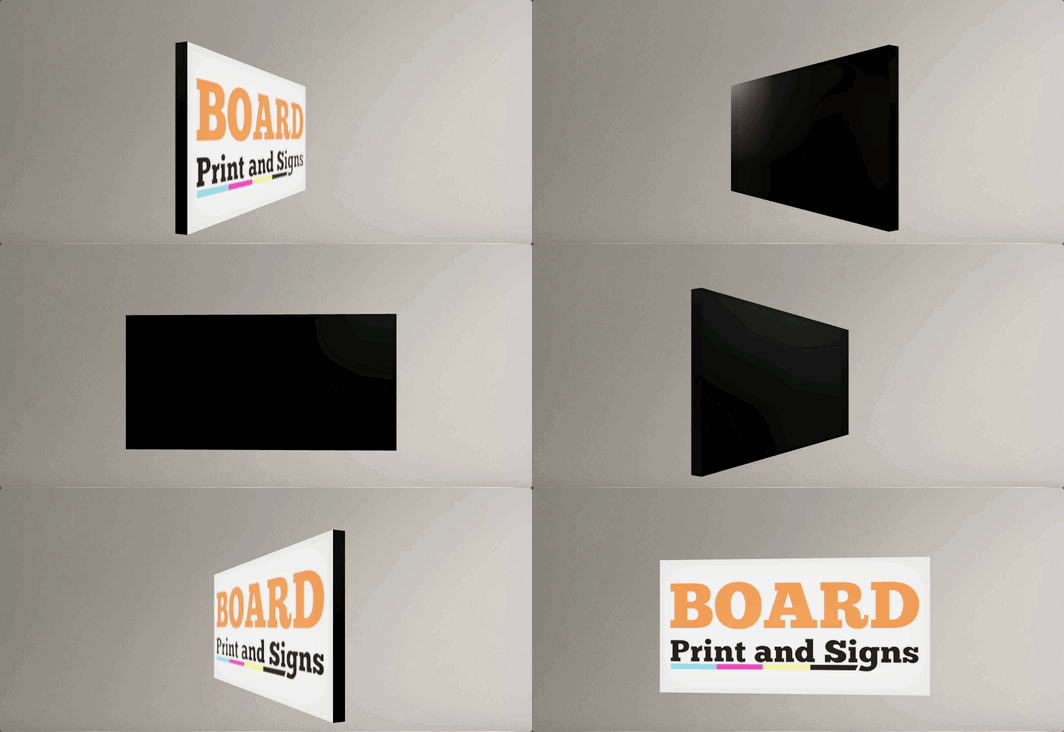
Slim lightbox designs with recessed borders

Sign Customiser now fully supports slim lightbox designs inside the customiser. If your lightbox signs only illuminate from one side — like a wall-mounted sign that doesn’t need a lit back panel — the 3D preview now accurately reflects this by showing the border trim on any disabled sides. You can also enable recessed borders for a cleaner, more modern look where the border sits flush with the face rather than overlapping it.

Slim lightbox sign preview in the customiser

What’s Changed

  • Slim (single-sided) lightbox supportLightbox signs with inactive sides are now officially supported in the customiser. Disabled sides display the border colour instead of a lit panel, giving customers an accurate preview of how the finished sign will look
  • Recessed border optionA new setting allows merchants to enable recessed borders on lightbox signs, removing the visible trim overlay from the face and back panels for a sleek, frameless appearance
  • Accurate 3D previewThe lightbox renderer correctly hides glow effects and images on inactive sides, so the preview matches the real product — whether it’s a single-sided wall sign or a fully illuminated hanging lightbox
  • Works across all lightbox shapesBox, circle, and oval lightbox shapes all support inactive sides and recessed borders
  • Automatic border trim enforcementThe admin and customiser now ensure lightbox signs always have the required border trim colour assigned, preventing incomplete configurations from reaching your customers

Apr 5, 2026

2026.4

AI Sign Designer now supports Material Length pricing

The AI Sign Designer just got a major expansion. Merchants using the Material Length pricing model can now offer AI-powered sign design directly in their customisers, opening up precise, path-based pricing for customer-uploaded artwork and AI-generated designs. We’ve also expanded Channel Letter sign support and made it faster than ever to get started with new demo templates.

Update, 1 October 2026:From 1 October 2026, AI Sign Designer V2 does not add a UV print to new neon designs. Designs that already have a UV print keep it. The manual UV print options do not change. See AI neon designs now show as lit tubes.

What’s Changed

  • Material Length pricing meets AI Sign DesignerCustomisers using the Material Length model can now accept AI-generated SVG designs with accurate per-letter measurements and pricing. Customers upload an image or describe their sign, and the AI produces a design that’s measured and priced using your existing material length rules
  • Channel Letter signs work with AI Sign DesignerChannel Letter product types are now fully supported in the AI Sign Designer flow, including face and halo colour effects, RGB options, and UV print colour preservation
  • UV print colours preserved from AI artworkWhen a customer uploads a multicolour design, the original fill colours from the AI artwork are automatically carried through as UV face print data, so what the customer sees in the preview matches what goes to production
  • New demo templates for faster setupThe customiser creation flow now includes AI Sign Designer demo data for eligible product types, so merchants can launch a fully configured customiser with AI design capabilities in just a few clicks
  • Streamlined onboardingThe standalone onboarding card has been replaced with an integrated setup experience that seeds AI Sign Designer settings alongside your demo data, reducing the steps needed to go live

Mar 31, 2026

2026.3

RGB Colour Options for Channel Letter Signs

Sign Customiser now brings the popular RGB colour effect to channel letter signs. Your customers can select RGB as a face or halo colour option and see a smooth, animated colour transition directly in the live preview — helping them visualise exactly how their sign will look with colour-changing LEDs before they buy.

RGB colour option animating across a channel letter sign preview

What’s Changed

  • RGB colour option for channel lettersCustomers can now choose an RGB multi-colour option for both the face and halo colours on channel letter signs, complete with an animated preview that cycles through the full colour palette
  • Animated colour transitionsThe live sign preview smoothly blends between colours in real time, giving customers a realistic sense of how RGB LED lighting will look on their finished sign
  • Colour preview swatches for all product typesThe rainbow gradient colour swatch that previews multi-colour options is now available across all product types, not just neon signs
  • Built-in demo dataNew channel letter customisers come pre-loaded with an RGB option on both face and halo colour palettes, priced at a 10% uplift by default so you can start selling immediately

Mar 31, 2026

2026.3

Optional letter parts can default to none

Sign Customiser now lets merchants control whether optional letter parts — like face colours or lighting effects — are pre-selected or left blank when a customer first opens the customiser. This gives you more flexibility over the initial sign preview and can simplify the buying experience for products where certain parts are truly add-ons.

What’s Changed

  • New “Default to none” settingWhen editing an optional colour selection in the admin, a new checkbox lets you choose whether the part starts unselected when the customiser loads
  • Cleaner starting experienceCustomers see a simpler sign preview by default and can add optional parts as they explore, rather than needing to remove pre-selected options
  • Backwards compatibleExisting optional parts continue to behave exactly as before, pre-selecting the first available colour

Mar 31, 2026

2026.3

Letter Rail Backboard Now Available

Letter rail sign preview in the customiser

You can now add a Letter Rail backboard to any channel sign customiser. Letter rail backboards display individual letters mounted on a sleek rail, offering a modern and versatile look without needing to set up a separate sign type.

What’s Changed

  • New Letter Rail backboard optionLetter Rail is now available as a backboard support type alongside Board, Raceway, Stand and Cut to Shape, configurable from the backboard editor on any channel sign customiser
  • Configurable bar height and gapControl the rail thickness and the spacing between the rail and the letters from the backboard padding settings
  • Automatic style inheritanceLetter rail backboards can inherit the same face colour and glow effects from the letters, ensuring a cohesive look without any extra configuration

Mar 30, 2026

2026.3

Expanded global font support

Sign Customiser’s font engine has been completely upgraded to support a much wider range of international fonts and scripts. Customers designing signs in Arabic, Hebrew, Chinese, Japanese, Korean, and other non-Latin languages will now see accurate letter rendering, correct text shaping, and reliable measurements — opening up your customiser to a truly global audience.

What’s Changed

  • Thousands more compatible fontsThe customiser now works with a significantly broader range of modern font formats, unlocking thousands of additional fonts from Google Fonts and custom uploads
  • Right-to-left language supportArabic, Hebrew, and other RTL scripts now render correctly with proper letter joining, ligatures, and contextual shaping
  • Accurate international measurementsSign dimensions and pricing are now calculated accurately for complex scripts where characters change shape based on their position in a word
  • Better multi-language signsMixing fonts from different languages on the same sign now produces more consistent sizing and spacing
  • Improved font cachingFonts load faster on return visits with more reliable caching, even when customers navigate away and come back to the customiser

Mar 24, 2026

2026.3

Google Ads click ID tracking for sign orders

Sign Customiser now automatically captures Google Ads click IDs (gclid, gbraid, and wbraid) from your customers’ sessions, giving you full visibility into which ad campaigns are driving sign orders and quote requests.

What’s Changed

  • Automatic click ID captureGoogle Ads click IDs are detected from URL parameters, cookies, and session storage so no customer interaction is missed
  • Click IDs included in form submissionsQuote requests and custom design submissions now pass ad tracking data through to your order emails and webhooks
  • Ad tracking in order emailsMerchant notification emails now display Google Ads click IDs when available, making it easy to match orders to campaigns
  • Event tracking enrichmentThe spc:product-created and spc:form-submitted JavaScript events now include ad click IDs, so your existing conversion tracking scripts can access them
  • Cross-iframe supportClick IDs are correctly passed through to the customiser even when embedded via iframe on Shopify, WooCommerce, or hosted pages
Open original

Get started

Add Sign Customiserto your store today

Install now
36+ verified reviews

Login

Universal Sign In
  • WordPress
  • Wix
  • Etsy
  • Squarespace
  • Webflow

Or, if on Shopify, navigate to your store admin to login.