
Letter Parts
Configure letter parts (Face, Side, Trim, Halo) with colours, materials, and per-part pricing for channel letter types
Last updated:
Letter parts are the individual components that make up a channel letter type — Face, Side, Trim, and Halo. Each letter part can have its own colours, materials, and pricing, giving you granular control over what customers can select and what each option costs.
You’ll find letter parts inside each Letter Type, under Sign Components → Letter Types in the admin sidebar.
Lightbox equivalent: If you’re configuring a lightbox customiser rather than channel letters, the equivalent feature is Lightbox Types under Sign Components. Lightbox Types use “component types” (Face, Back, Border, Internal Light) instead of “letter parts”. See the Lightbox Types article for details.
What Are Letter Parts?
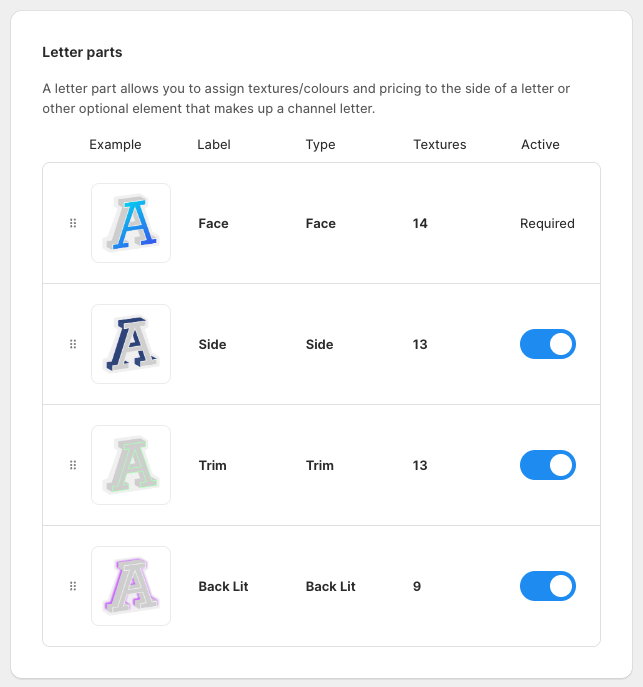
Each Letter Type in your customiser is made up of these parts:
-
Face — the front surface of the letter that customers see head-on
-
Side — the return or edge of the letter (the depth)
-
Trim — the decorative trim cap around the letter edge
-
Halo — the backlit glow effect behind the letter
Not every letter type needs all four parts. You can enable or disable each one depending on your product.
How to Configure Letter Parts
-
Navigate to the Sign Customiser admin and open the customiser you want to edit.
-
Click Letter Types in the left-hand sidebar under Sign Components.
-
Click on the Letter Type you want to configure (e.g. “3D Illuminated Acrylic”).
-
The letter parts card shows the available parts: Face, Side, Trim, and Halo. Use the toggles to enable or disable individual parts for this letter type.
-
Click on a letter part to edit its settings: — Label and Description: what the customer sees — Colours/Materials: the options available for this part — Pricing: per-part pricing (see below)
-
Save your changes.
Letter Part Pricing
Each letter part can carry its own pricing, which layers on top of your base pricing from Core Setup → Pricing.
This means you can charge different amounts for different materials or colours on each part. For example:
-
A brushed stainless steel face can cost more than a standard acrylic face
-
A gold chrome side finish can carry a premium over a matte black side
-
Enabling a halo backlight can add a per-character surcharge
The pricing hierarchy works like this:
-
Core Setup → Pricing — your base per-character or per-size price
-
Letter Part pricing — additional costs for specific materials/colours on each part
-
Mountings — optional supplementary mounting fees