

Creating and managing multiple stores under one account
Last updated:
The store switcher and Add a store are in the Sign Customiser admin at web.signcustomiser.com. The Shopify admin does not show them.
Do you want to copy a customiser between stores? Refer to Copy a customiser to another store you own.
Sign Customiser supports more than one store in a single company account. Each store has its own configuration and customisers. You can use different stores for different websites, platforms, or brands.
Add a store
Only a Company owner can add a store.
-
Sign in to the Sign Customiser admin. Open web.signcustomiser.com and log in.
-
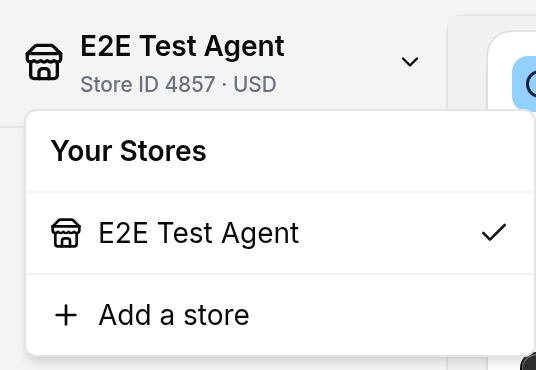
Open the store switcher. Click your current store name in the top-left corner of the sidebar. The list Your Stores shows each store.
-
Click “Add a store” at the bottom of the list. If you cannot see this item, ask a Company owner to add the store.
-
Read the banner in the dialog. It says that additional stores get a discount on their subscription. It also says that you choose a plan on the next screen.
-
Enter a store name in the Store name field. The placeholder is “e.g. New York Showroom”. Use a name that is easy to identify.
-
Click “Add store”. The admin switches to the new store and opens the Your Subscription page. Choose a plan on this page.
At checkout, the discount applies only if your primary store has an active subscription that is not on a trial and is not set to cancel. A store that never had a subscription can start with a 7-day trial. For more information, refer to “Pricing for additional stores”.
Rename a store
-
Switch to the store that you want to rename.
-
Go to Your Store > Store Settings.
-
Change the Store name in Store Details.
-
Click Save.

You cannot remove a store in the admin.
Switching between stores
-
Open the store switcher. Click the current store name in the top-left corner of the sidebar.
-
Select the store you want. The list shows each store by name. A tick shows the current store. The Store ID and currency show below the current store name at the top of the sidebar.
-
Wait for the switch. The message Switching Stores shows for about three seconds. Then the Home page of the selected store opens.
Pricing for additional stores
Each store needs its own subscription. Your primary store costs the full price. Each additional store gets a discount if your primary store has an active subscription that is not on a trial and is not set to cancel. If it does not, checkout does not apply the discount. The discount applies when you choose a plan for the new store.
To see all your stores, go to Your Company > Billing. If you have more than one store, the page name is Billing Management. If you have one store, the page name is Your Subscription.
-
Your primary store has a Primary badge on Billing Management. Hover over the badge to read how the store is billed.
-
Each additional store has its own card next to the primary store. Use the button on a card to choose or manage the plan for that store.
For more information about plan tiers, refunds, and resubscribing, refer to Subscription plans and billing explained.
Change your primary store
On Billing Management, a store can show a Make Primary button. The store must not already be the primary store. Only a Company owner can use this button. The change succeeds only for a store that has an active subscription that is not on a trial and is not set to cancel. A store on a trial can still show the button, but the admin refuses the change.
-
Click Make Primary on the store card.
-
Read the message. The new primary store loses its discount. The previous primary store gets the discount.
-
Click Set as Primary Store.