

Custom CSS
Use css to create your own styles for Sign Customiser
Last updated:
This guide shows how to add custom CSS to your customiser, find element class names, and use example CSS codes.
Use these links to go to a section:
Important: Custom CSS styles the options panel (sidebar) and the elements around it. It cannot edit the text of the sign.
The sign is drawn as pixels on a canvas element, so CSS cannot edit its text or its drawn shapes. A rule that targets the canvas element itself, such as a filter or transform, can change how the sign looks. You can style the frame around the visualiser (the preview area that shows the sign). For example, use the class .npc-frame-preview. A rule on the frame can change the size of the area where the sign is drawn, and so can change where the sign sits.
To let customers move, resize, or rotate the individual words and shapes in a sign, turn on Enable Dragging, Enable Scaling, and Enable Rotation under Drag, Scale, Rotate. This feature is not included in legacy plans. Read Drag, Scale, Rotate Words and Icons.
How to Add Custom CSS the Right Way
Follow these steps. They work for Universal and Shopify users.
-
Open the Customisers page.
-
In the Universal admin (web.signcustomiser.com), click Customisers in the sidebar.
-
In Shopify admin, open the app you installed from the Shopify App Store. Then click Customisers in the app menu.
-
-
Click the name of the customiser you want to edit.
-
Open the live preview.
-
If the customiser page is 1200 px wide or wider, the preview is on the customiser page already. In the Universal admin, the sidebar uses about 232 px, so the browser window must be about 1432 px wide or wider.
-
If the customiser page is less than 1200 px wide, click Preview in the page header.

-
-
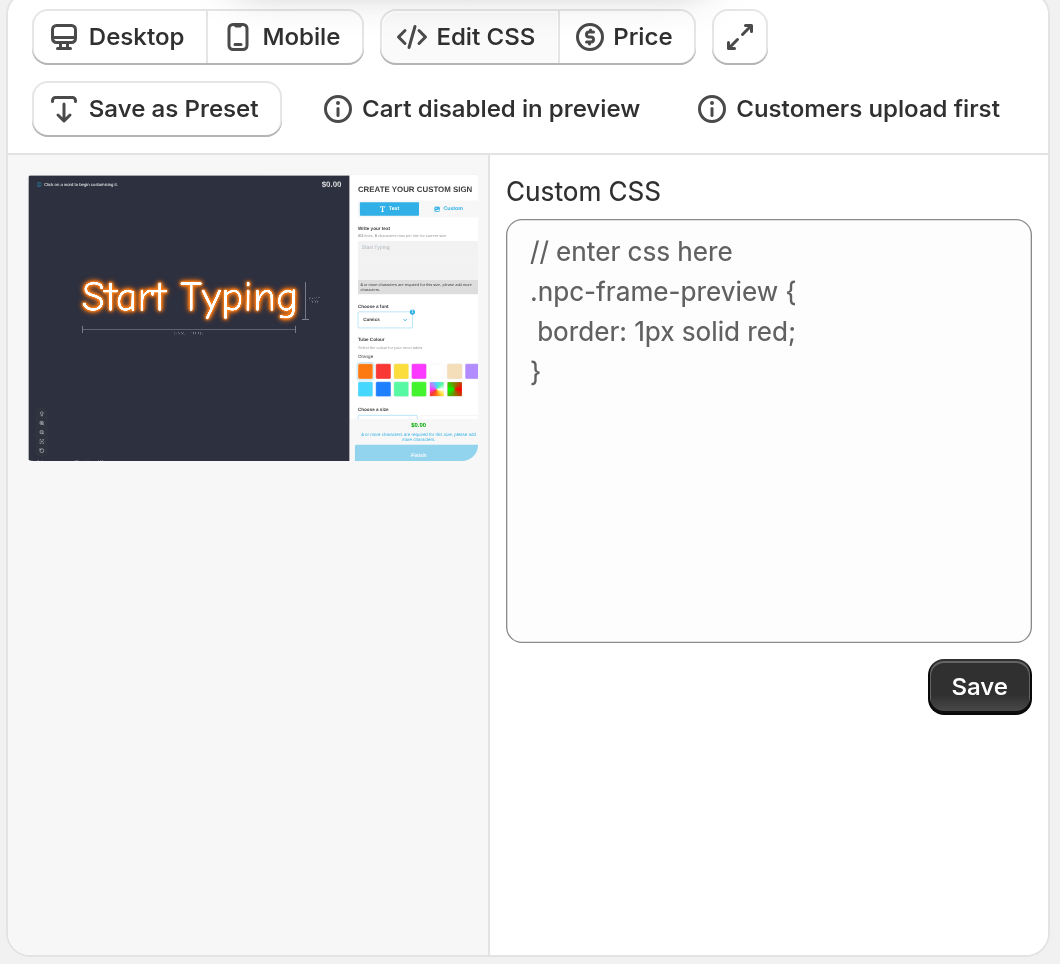
At the top of the preview, click Edit CSS.
-
A Custom CSS text box appears on the right of the preview. Type or paste your CSS code in the box.
-
The preview updates about half a second after you stop typing. Click Save to apply the CSS to your live customiser.
How to find element class names for your CSS code
To style an element, you must know its class name. To find it, do these steps:
Class names that start with npc- are stable. Sign Customiser does not rename them. Other class names, such as the Tailwind tw- utility classes, are not a styling contract and can change after an update. Use npc- class names in your CSS.
-
Open your customiser page on the live site.
-
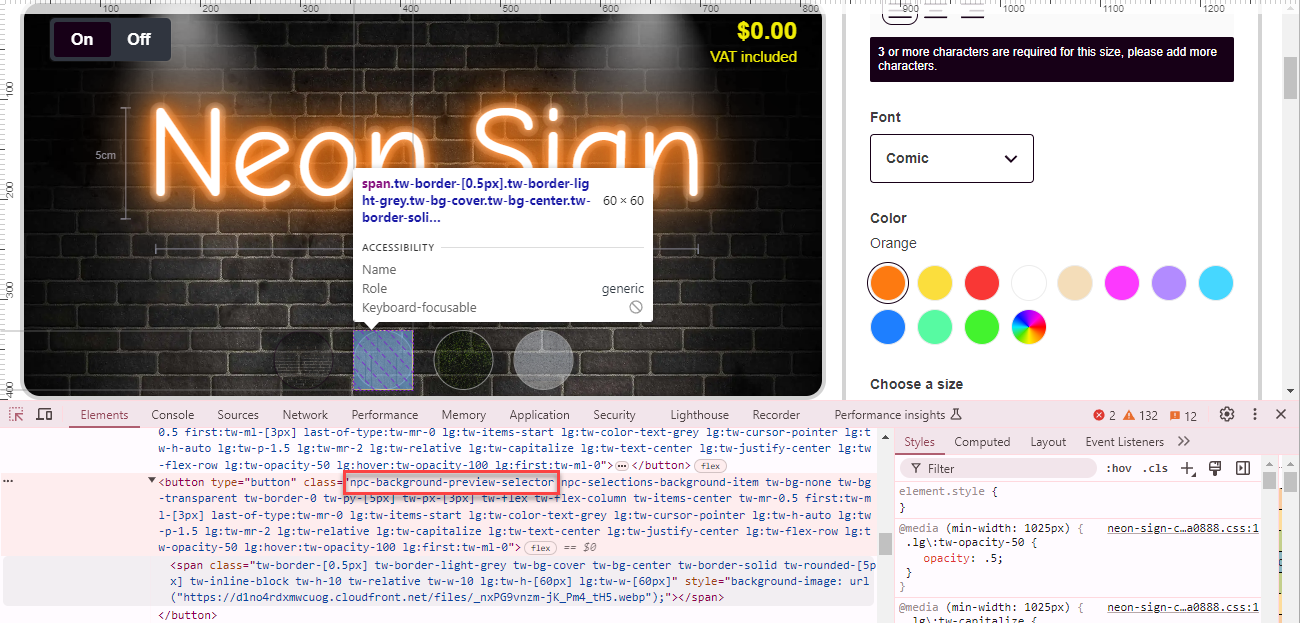
In Chrome, right-click the element you want to style and select Inspect.
-
The Chrome developer tools open and show the element.
-
The Elements panel shows the HTML of the element. Find its
classattribute, and look for the classes that start with “npc-”. These classes are specific to the Sign Customiser. For example: npc-background-preview-selector npc-selected npc-selections-background-item.
Example CSS Codes
Here are some common CSS codes that change the front-end style of your customisers:
Example: colour selector buttons
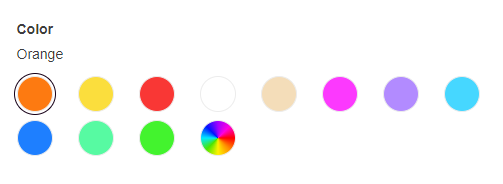
Show 8 colour buttons on each row and make them round.
CSS Code:
#neon-customiser-app .npc-selections-color .npc-preview-selector span,#neon-customiser-app .npc-selections-color .npc-preview-selector span::before { border-radius: 50%;}#neon-customiser-app .npc-selections-color .npc-selections-letter-part-color-previews .npc-list { grid-template-columns: repeat(8, minmax(0, 1fr));}Result:
Example: 4 fonts on a row on Desktop
CSS Code:
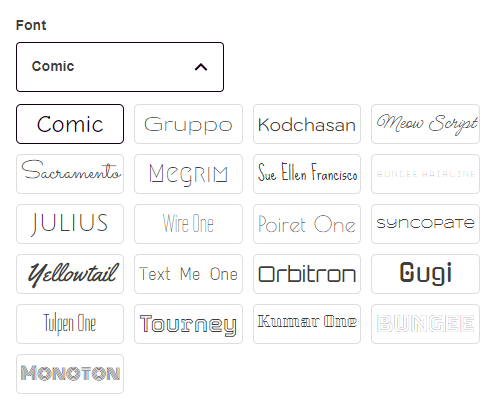
@media (min-width: 1025px) { #neon-customiser-app .npc-selections-font .npc-selections-font-list .npc-list { grid-template-columns: repeat(4, minmax(0px, 1fr)); }}Result:
Example: 3 fonts on a row on mobile
This rule works when Mobile Selection Options Display is set to Stack Vertically. To find this setting, open General Settings and look under Mobile Style Options. If you select Scroll Horizontally, the options scroll sideways and the grid rule does not apply.
CSS Code:
@media (max-width: 1024px) { #neon-customiser-app .npc-selections-font .npc-selections-font-list .npc-list { grid-template-columns: repeat(3, minmax(0px, 1fr)); }}Result:
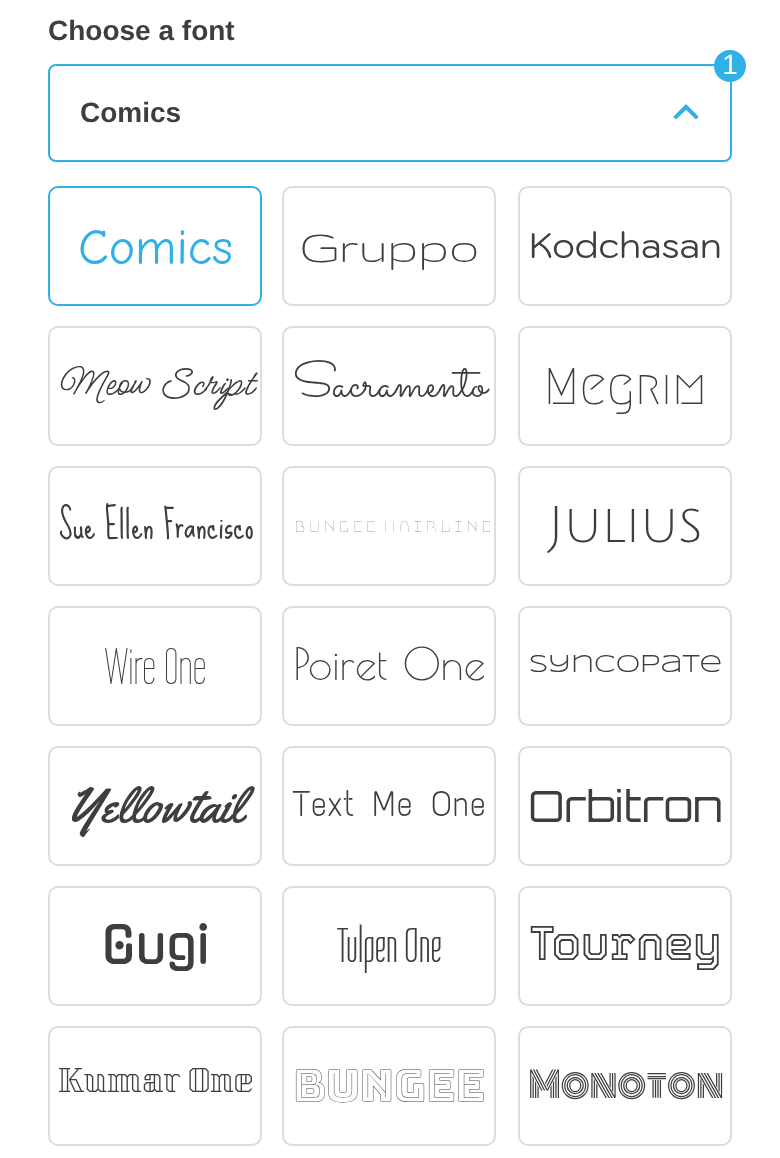
Example: style the loading spinner
The loading spinner uses the class npc-loader. It appears while fonts load and while a form is sent. Use it to change the colour, size, or speed of the spinner.
The spinner for an uploaded custom design is a different element. It uses the class npc-file-selection-compression-icon.
The add-to-cart progress window is a different element. It shows over the whole page. Its spinning icon uses the class npc-add-to-cart-loader-step-icon--active. This icon is an SVG, so use color to change its colour. The example below styles both spinners.
CSS Code:
/* Spinners inside the options panel (fonts, forms) */#neon-customiser-app .npc-loader {  border-color: #e0e0e0;        /* ring */  border-top-color: #ff0099;    /* moving highlight */  width: 40px;  height: 40px;  animation-duration: 1s;       /* spin speed */}
/* Add-to-cart progress window, shown over the whole page */.npc-add-to-cart-loader .npc-add-to-cart-loader-step-icon--active {  color: #ff0099;}
The code below is a longer example. It combines many of the rules in this article. Remove the rules you do not need. Replace the image URLs with your own images. The last rules put an icon on each row of the review step. Each rule counts rows with nth-child, and the rows that show depend on the options of your customiser. Change the numbers to match your rows.
#neon-customiser-app .npc-frame-preview.npc-review-frame { background: linear-gradient(0deg, rgb(101, 40, 107) 0%, rgb(42, 31, 61) 79%);}#neon-customiser-app .npc-frame-preview.npc-review-frame .npc-review-header>div { color: white;}#neon-customiser-app .npc-title-example-button, #neon-customiser-app .npc-selection-button-example-button { font-size: 18px; line-height: 1; color: rgba(1,1,1,0) !important; font-weight: 400; height:16px; width: 16px; overflow: hidden; background-image: url('https://cdn.shopify.com/s/files/1/0652/9413/9630/files/eye-blue.svg') !important; background-repeat: no-repeat; background-size: cover;}#neon-customiser-app .npc-title-example-button:hover, #neon-customiser-app .npc-selection-button-example-button:hover { color: rgba(1,1,1,0) !important; background-image: url('https://cdn.shopify.com/s/files/1/0652/9413/9630/files/eye.svg') !important;}/* Set max width */#neon-customiser-app .npc-main-container { margin: auto; max-width: 1600px; line-height: 1.2;}@media screen and (min-width: 1025px) { #neon-customiser-app .npc-frame-preview, #neon-customiser-app .npc-custom-design { margin-right: 8px; } #neon-customiser-app .npc-sidebar { margin-left: 8px; } div#neon-customiser-app { margin: 20px 20px 0px 20px; }}@media screen and (max-width: 1024px) { #neon-customiser-app .npc-frame-preview { margin-bottom: 12px; } div#neon-customiser-app { padding: 20px 0px 0px 0px; }}#neon-customiser-app .npc-selection-button-subtitle, #neon-customiser-app .npc-selection-button-example-subtitle { font-weight: 400;}#neon-customiser-app .npc-custom-design { background: linear-gradient(0deg, rgb(101, 40, 107) 0%, rgb(42, 31, 61) 79%); background-size: cover; background-position: center; background-repeat: no-repeat; border-radius: 20px; border: lightgrey solid 4px; overflow: scroll;}#neon-customiser-app .npc-custom-design .npc-custom-design-heading { margin-bottom: 100px;}#neon-customiser-app .npc-custom-design .npc-custom-design-steps { max-width: 90%; padding: 0px;}#neon-customiser-app .npc-custom-design .npc-custom-design-steps h2 { line-height: 1.2; margin-top: 12px;}#neon-customiser-app .npc-custom-design .npc-custom-design-steps p { color: white;}#neon-customiser-app .npc-custom-design .npc-custom-design-steps div:nth-child(1)::before { background-image: url('https://cdn-icons-png.flaticon.com/128/427/427735.png');}#neon-customiser-app .npc-custom-design .npc-custom-design-steps > div:nth-child(2)::before { background-image: url('https://cdn-icons-png.flaticon.com/128/1651/1651602.png');}#neon-customiser-app .npc-custom-design .npc-custom-design-steps > div:nth-child(3)::before { background-image: url('https://cdn-icons-png.flaticon.com/128/10152/10152776.png');}#neon-customiser-app .npc-custom-design .npc-custom-design-steps:last-child > div:nth-child(1)::before { background-image: url('https://cdn-icons-png.flaticon.com/64/609/609361.png');}#neon-customiser-app .npc-custom-design-steps > div::before { content: ""; display: inline-block; width: 48px; height: 48px; background-repeat: no-repeat; background-size: contain;}#neon-customiser-app .npc-sidebar-custom-design .npc-button-container { background: var(--secondary-neon-colour); border-radius: 30px; margin: 30px auto; max-width: 70%; padding: 12px 28px; font-size: 16px;}#neon-customiser-app .npc-sidebar-custom-design .npc-button-container span { color: white;}#neon-customiser-app .npc-sidebar-custom-design .npc-button-container span::after { content: ""; display: inline-block; width: 16px; height: 16px; background-image: url('https://cdn.shopify.com/s/files/1/0652/9413/9630/files/upload.png?v=1687333556'); background-repeat: no-repeat; background-size: contain; margin-left: 5px; position: relative; top: 3px;}/* CSS separate the visualiser panel from the options panel */#neon-customiser-app .npc-frame-preview, #neon-customiser-app .npc-sidebar { border-radius: 20px; border: lightgrey solid 4px; overflow: hidden;}#neon-customiser-app .npc-selections-backboard .npc-list { grid-template-columns: repeat(2, 1fr); grid-template-rows: auto 1fr;}#neon-customiser-app .npc-list .npc-button-container { padding: 8px;}#neon-customiser-app .npc-list .npc-button-container .npc-selection-button-example-title { margin-right: unset;}/* CSS size items */#neon-customiser-app .npc-selections-size .npc-list { display: grid; grid-template-columns: repeat(5, 1fr); grid-auto-rows: auto; gap: 4px;}#neon-customiser-app .npc-selections-size .npc-list > :nth-last-child(1) { grid-column: 1 / span 5;}#neon-customiser-app .npc-selections-size .npc-selection-button .npc-button-container { padding: 12px 4px 4px; margin-bottom: 4px;}/* CSS size items text, icon */#neon-customiser-app .npc-selections-size .npc-selection-button .npc-selection-button-subtitle { text-align: center; font-weight: 400;}#neon-customiser-app .npc-selections-size .npc-selection-button:last-child .npc-selection-button-subtitle::after { content: ""; display: inline-block; width: 24px; height: 24px; background-image: url('https://www.svgrepo.com/show/277455/edit-tools-ruler.svg'); background-repeat: no-repeat; background-size: cover;}#neon-customiser-app .npc-selections-size .npc-selection-button .npc-button-container>div>div { justify-content: center; text-align: center;}#neon-customiser-app .npc-selections-size .npc-selections-size-slider+div { margin-top: 3px;}#neon-customiser-app .npc-selections-size .npc-selections-size-slider input { width: 90%;}#neon-customiser-app .npc-selections-size .npc-selection-button:last-child .npc-button-container { margin: 0px;}#neon-customiser-app .npc-selections-backboard .npc-selection-button-example .npc-button-container { border-radius: 4px; background: #f1f1f1;}/* Jacket */#neon-customiser-app .npc-selections-jacket .npc-list { grid-template-columns: repeat(2, 1fr); grid-template-rows: auto 1fr;}#neon-customiser-app .npc-selections-jacket p.npc-selection-button-title { display: grid; width: 100%;}#neon-customiser-app .npc-selections-jacket .npc-selection-button-title::before { content: ""; display: inline-block; width: 72px; height: 12px; border-radius: 5px; background-color: white; margin: 4px 0px 16px; border: 1px solid var(--outline-neon-colour);}#neon-customiser-app .npc-selections-jacket .npc-selection-button:last-child .npc-selection-button-title::before { background-color: var(--sign-colour);}/* Set min height for additional options note textarea */#neon-customiser-app .npc-selections-additional-item textarea { min-height: 150px; width: 100% !important;}/* Round colour selector buttons */#neon-customiser-app .npc-selections-color .npc-preview-selector span, #neon-customiser-app .npc-selections-color .npc-preview-selector span::before { border-radius: 50%;}#neon-customiser-app .npc-selections-color .npc-selections-letter-part-color-previews .npc-list { grid-template-columns: repeat(8, minmax(0, 1fr));}/* Display 4 fonts on a row on desktop */@media (min-width: 1025px) { #neon-customiser-app .npc-selections-font .npc-selections-font-list .npc-list { grid-template-columns: repeat(4, minmax(0px, 1fr)); }}@media (max-width: 1024px) { #neon-customiser-app .npc-selections-font .npc-selections-font-list .npc-list { grid-template-columns: repeat(3, minmax(0px, 1fr)); }}/* Reduce height of font buttons */#neon-customiser-app .npc-selections-font .npc-font-button { height: 40px; padding: 0px 4px;}#neon-customiser-app .npc-selections-size .npc-list { justify-content: center !important;}#neon-customiser-app .npc-selections-additional-item:last-child textarea { background: #f1f1f1; border: 1px solid var(--secondary-neon-colour); outline: none;}#neon-customiser-app .npc-selections-additional-item:last-child textarea:focus-visible { box-shadow: 0 0 0 0 red,0 0 .5rem .4rem rgba(0, 0, 0, 0.3);}/* Center background buttons on desktop*/@media screen and (min-width: 1025px) { #neon-customiser-app .npc-selections-background { left: 50%; transform: translateX(-50%); } #neon-customiser-app .npc-selections-background .npc-selections-background-list { justify-content: center; }}#neon-customiser-app .npc-selections-background .npc-selections-background-item> span { border-radius: 50%;}#neon-customiser-app .npc-sidebar-review .npc-sidebar-review-details>p { display: grid; grid-template-columns: auto auto; justify-content: space-between; width: 100%; border-bottom: 1px solid grey;}/* Review step icons. Change the nth-child numbers to match the rows of your customiser */#neon-customiser-app .npc-sidebar-review .npc-sidebar-review-details > p b::before { content: ""; display: inline-block; width: 16px; height: 16px; background-size: cover; margin-right: 5px; vertical-align: text-top;}#neon-customiser-app .npc-sidebar-review .npc-sidebar-review-details p:nth-child(2) b::before { background-image: url(https://cdn.shopify.com/s/files/1/0652/9413/9630/files/ruler_1.png?v=1688752479);}#neon-customiser-app .npc-sidebar-review .npc-sidebar-review-details p:nth-child(3) b::before { background-image: url(https://cdn.shopify.com/s/files/1/0652/9413/9630/files/pen.png?v=1688752530);}#neon-customiser-app .npc-sidebar-review .npc-sidebar-review-details p:nth-child(4) b::before { background-image: url(https://cdn.shopify.com/s/files/1/0652/9413/9630/files/font.png?v=1688750267);}#neon-customiser-app .npc-sidebar-review .npc-sidebar-review-details p:nth-child(5) b::before { background-image: url(https://cdn.shopify.com/s/files/1/0652/9413/9630/files/color-palette.png?v=1688750365);}#neon-customiser-app .npc-sidebar-review .npc-sidebar-review-details p:nth-child(6) b::before { background-image: url(https://cdn.shopify.com/s/files/1/0652/9413/9630/files/blackboard.png?v=1688751181);}#neon-customiser-app .npc-sidebar-review .npc-sidebar-review-details p:nth-child(7) b::before { background-image: url(https://cdn.shopify.com/s/files/1/0652/9413/9630/files/chalk-board.png?v=1688751326);}#neon-customiser-app .npc-sidebar-review .npc-sidebar-review-details p:nth-child(8) b::before { background-image: url(https://cdn.shopify.com/s/files/1/0652/9413/9630/files/pipe.png?v=1688751736);}#neon-customiser-app .npc-sidebar-review .npc-sidebar-review-details p:nth-child(9) b::before { background-image: url(https://cdn.shopify.com/s/files/1/0652/9413/9630/files/metal.png?v=1688751936);}#neon-customiser-app .npc-sidebar-review .npc-sidebar-review-details p:nth-child(10) b::before { background-image: url(https://cdn.shopify.com/s/files/1/0652/9413/9630/files/desktop.png?v=1688752038);}#neon-customiser-app .npc-sidebar-review .npc-sidebar-review-details p:nth-child(11) b::before { background-image: url(https://cdn.shopify.com/s/files/1/0652/9413/9630/files/remote.png?v=1688752108);}#neon-customiser-app .npc-sidebar-review .npc-sidebar-review-details p:nth-child(12) b::before { background-image: url(https://cdn.shopify.com/s/files/1/0652/9413/9630/files/plug.png?v=1688752246);}#neon-customiser-app .npc-sidebar-review .npc-sidebar-review-details p:nth-child(13) b::before { background-image: url(https://cdn.shopify.com/s/files/1/0652/9413/9630/files/audio-jack.png?v=1688752345);}#neon-customiser-app .npc-sidebar-review .npc-sidebar-review-details p:nth-child(14) b::before { background-image: url(https://cdn.shopify.com/s/files/1/0652/9413/9630/files/writing.png?v=1688752422);}