
How to find the SVG, EPS, .AI file in the Shopify
Last updated:
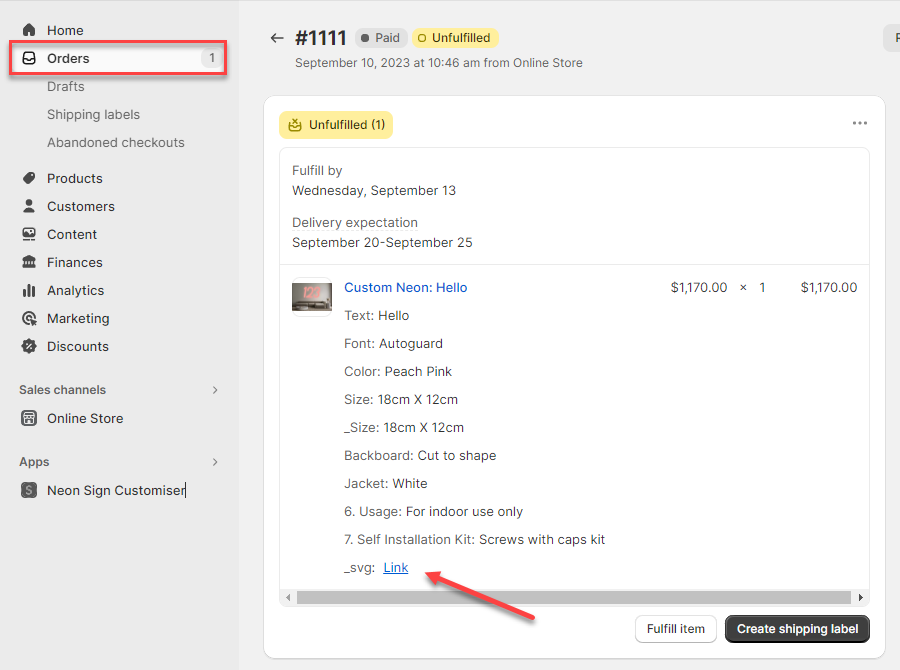
whenever a sign is ordered, you can access the order in Shopify admin page and download the SVG file by clicking on the _svg: “Link”.
To use this feature, you must have already enabled the SVG Files for manufacturing.
EPS and Illustrator-compatible PDF files
Only the SVG file appears directly in the Shopify order. EPS and Illustrator-compatible PDF (AI) files are delivered through two other routes:
-
The manufacturer email sent for each order — add download links for EPS and AI alongside the SVG link using the template variables. See How to include SVG, EPS, and Illustrator-compatible PDF files in the manufacturer email.
-
The Sign Customiser admin — uploaded AI Sign Designer logos and generated product media both show EPS and AI download buttons alongside the SVG, once those formats are enabled.