

Retrieve generated sign products not purchased
Last updated:
Sign Customiser adds the sign-customiser-generated tag to each product that it generates after the release at 10:46 UTC on 3 August 2026. After Sign Customiser records a Shopify order for a product, it adds the npc_ordered tag to that product in Shopify. Use both tags in the Shopify product search to find generated products that do not have the npc_ordered tag.
-
Log in to your Shopify admin and open Products.
-
Click the Search and filter field.
-
Enter
tag:sign-customiser-generated AND NOT tag:npc_ordered. -
Shopify shows the generated sign products that do not have the npc_ordered tag.
Filter one customiser
Products generated after the release at 18:13 UTC on 3 August 2026 also have a tag that is sc-customiser- and the Customiser ID. For example, to see only the products from customiser 9025, add AND tag:sc-customiser-9025 to the search. The full search is tag:sign-customiser-generated AND tag:sc-customiser-9025 AND NOT tag:npc_ordered. Find the ID in the Customiser ID column on the Customisers page in Sign Customiser.
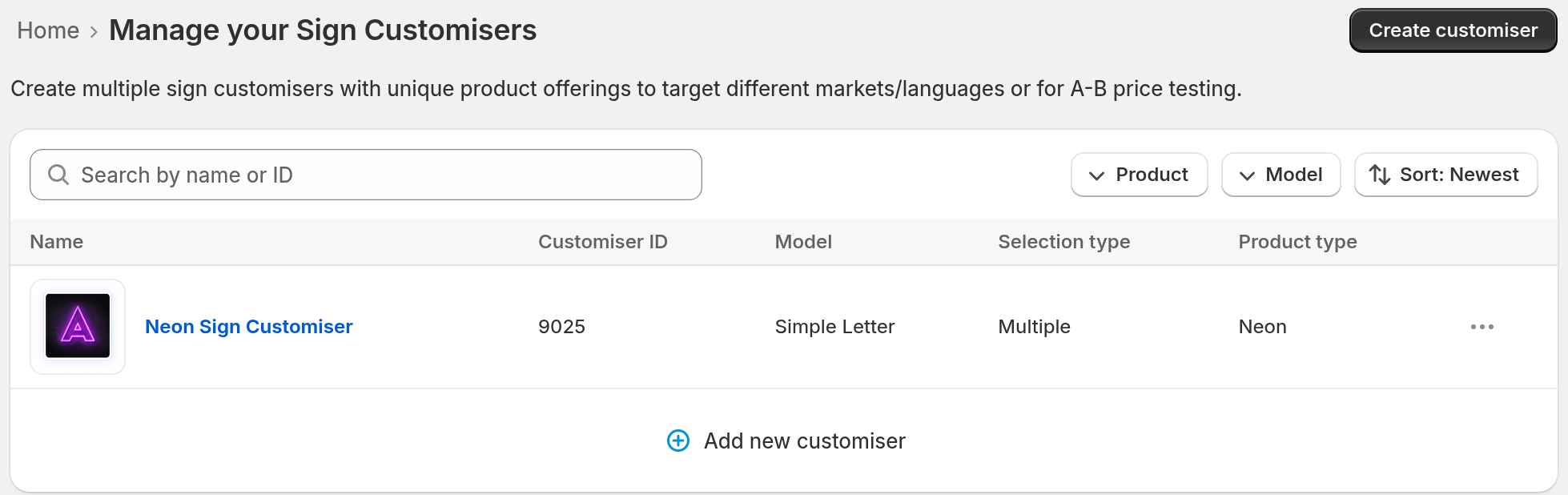
You can also open the managed collection that has the name of the customiser. These limits apply:
-
Sign Customiser does not create this collection on Shopify Starter or Retail stores.
-
If the customiser has no name, the collection title is Customiser followed by the ID, for example Customiser 9025.
-
The collection also shows purchased products. The npc_ordered tag does not remove a product from the collection. To leave out purchased products, use the full search in the Search and filter field on the Shopify admin Products page.
Older products
Products that Sign Customiser generated before 3 August 2026 (UTC) do not have the sign-customiser-generated tag or the sc-customiser- tag. The search above does not find them. Products from 3 August 2026 can have some of these tags or none, depending on the time of generation. Every product that Sign Customiser generated before the release at 13:08 UTC on 3 August 2026 has the product type Custom Neon, for each sign type. To find the older products that are not purchased, export your products from Shopify. On the Products page, click Export, choose All products and click Export products. Shopify sends the CSV file to you by email. In the file, keep the rows where the Type column is Custom Neon and the Tags column does not include npc_ordered. This also keeps new neon products, because they also have the type Custom Neon. The npc_ordered tag shows only the orders that Sign Customiser recorded. A product without the tag might still have been sold if Sign Customiser did not record the order.
Product types
Do not filter only on the product type Custom Neon. Older products use it for each sign type. Products generated after the release at 13:08 UTC on 3 August 2026 have a product type that matches the sign category:
-
Custom Neon
-
Custom Acrylic Sign
-
Custom Metal Sign
-
Custom Cut-out Metal Sign
-
Custom Stencil
-
Custom Wooden Sign
-
Custom Aluminium Sign
-
Custom Braille Sign
-
Custom Wood Frame Sign
-
Custom Lightbox
Check purchases in Sign Customiser
This method does not use Shopify tags. It uses the orders that Sign Customiser recorded.
-
Open Sign Customiser from your Shopify admin. Then open Products.
-
Read the Purchased column. Each product shows Purchased or Not purchased.
-
Open a product. The page shows its Purchased status and the orders that include it.
The list has no purchase filter. To make the list shorter, use the title search, the Product category filter or the date filter.