

The confirmation email your customer receives
Last updated:
You can send an email to your customer when they submit a quote request or a custom design form. This email is the Customer Confirmation Email. It is the only email under Email Workflows that goes to your customer.
It is switched off by default
Sign Customiser sends no acknowledgement when a customer submits a quote request or a custom design form until you turn it on. If you never opened this page, your customers receive no acknowledgement.
Which email goes to whom
Each customiser has three email pages under Email Workflows. The other two are not for your customer.
-
Customer Confirmation Email — goes to your customer. It tells them that you received their quote request or custom design submission.
-
Manufacturer Email — goes to the Receiver Email that you set on its page. If that field is blank, it goes to the manufacturer assigned to the customiser. If there is none, it goes to your Store’s default email. For a Store that is connected to Shopify, that is the email that Shopify holds for your store. For a Store that is not connected to Shopify, it goes to the Store owner. Your customer does not see it.
-
Custom Design Form Email — goes to the Receiver Email that you set for the custom design form in Forms. It has all the data that the customer submitted. If that field is blank, it goes to your Store’s default email (the same rule as above). Your customer does not see it.
Did you edit one of the last two emails to change what your customer reads? Then you edited your own copy. Edit the Customer Confirmation Email instead.
Turn it on
-
Open your Sign Customiser admin and click Customisers.
-
Click the customiser that you want.
-
In the left-hand menu, under Email Workflows, click Customer Confirmation Email.
-
Tick Send a confirmation email to my customer.
-
Click Save.
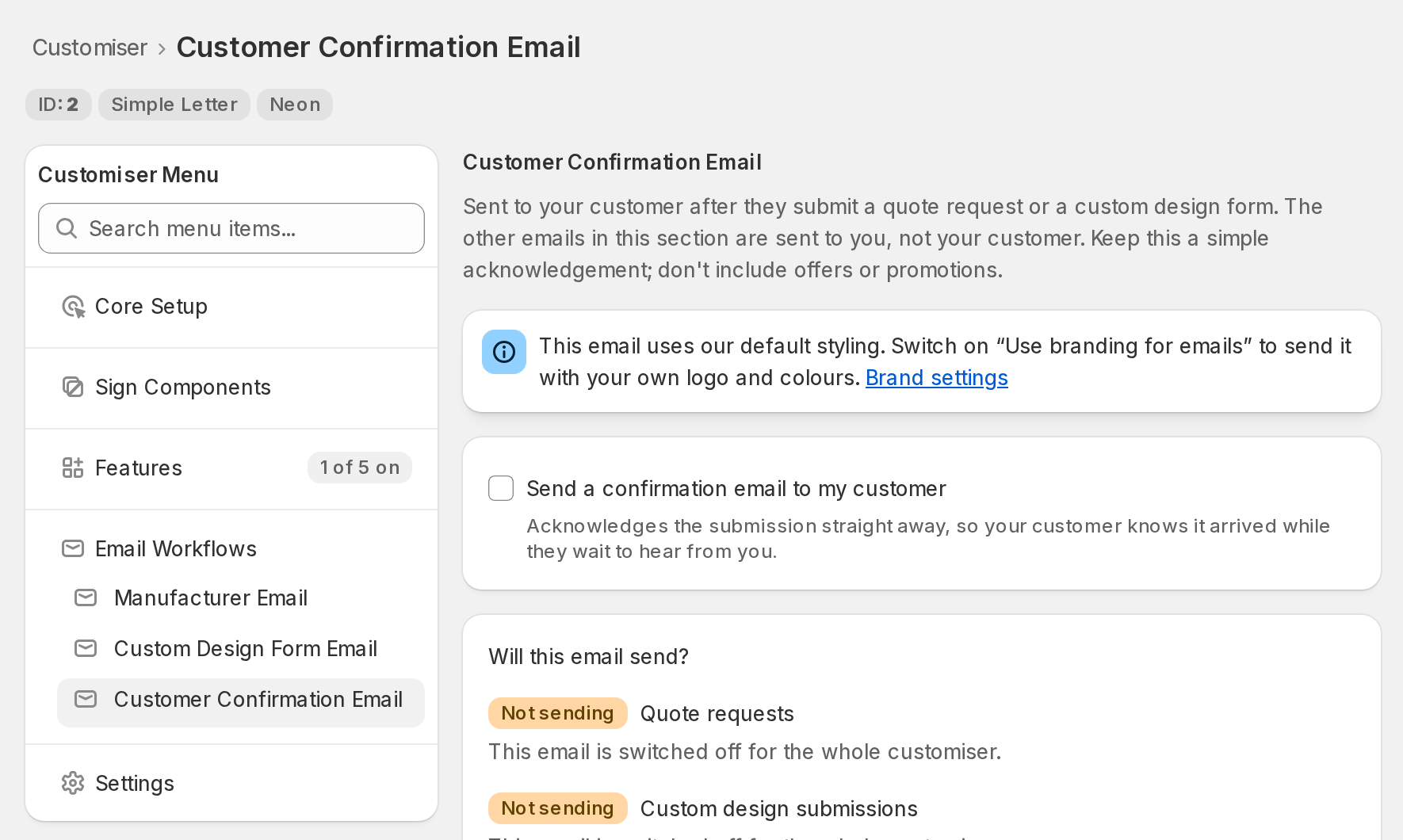
The setting applies to the whole customiser. It covers quote requests and custom design submissions on that customiser. If you have more than one customiser, turn it on for each one.
Will it send?
Under the checkbox, a panel called Will this email send? shows two rows. One row is for quote requests. One row is for custom design submissions. Each row says Sending or Not sending. A row that says Not sending gives the reason and a link to the page that fixes the problem. The one exception is when the email is switched off for the whole customiser (see below).
The panel shows your saved settings. It changes after you click Save. It does not change when you tick the checkbox.
A row says Sending only when all of its conditions are true.
Quote requests
-
Quote Mode is on. Check this on the Quote Mode page.
-
Quote Mode has a quoting form selected.
-
The quoting form has an email field. Add the field in Forms.
Custom design submissions
-
Your plan includes custom design forms.
-
AI Sign Designer or Upload form is on. Check this in Core Setup → How customers design. The menu shows In use beside the way that customers see.
-
At least one custom design form has an email field. Add the field in Forms.
When the saved setting is off (you unticked the checkbox and clicked Save), both rows say that the email is switched off for the whole customiser. Neither row shows a link.
Write the email
Sign Customiser includes a subject line and two email bodies. You do not have to change them. You can rewrite all three.
-
Subject is the same for both types of submission.
-
Quote requests email body goes out when a customer submits a quote request.
-
Custom design submissions email body goes out when a customer submits a custom design form.
Each body is stored in its own field. When you edit one body, the other body does not change. The Save button at the bottom of the page saves both bodies together with the other settings. Each body has a Reset to default button. The button restores the original text of that body only in the editor. Click Save to keep it.
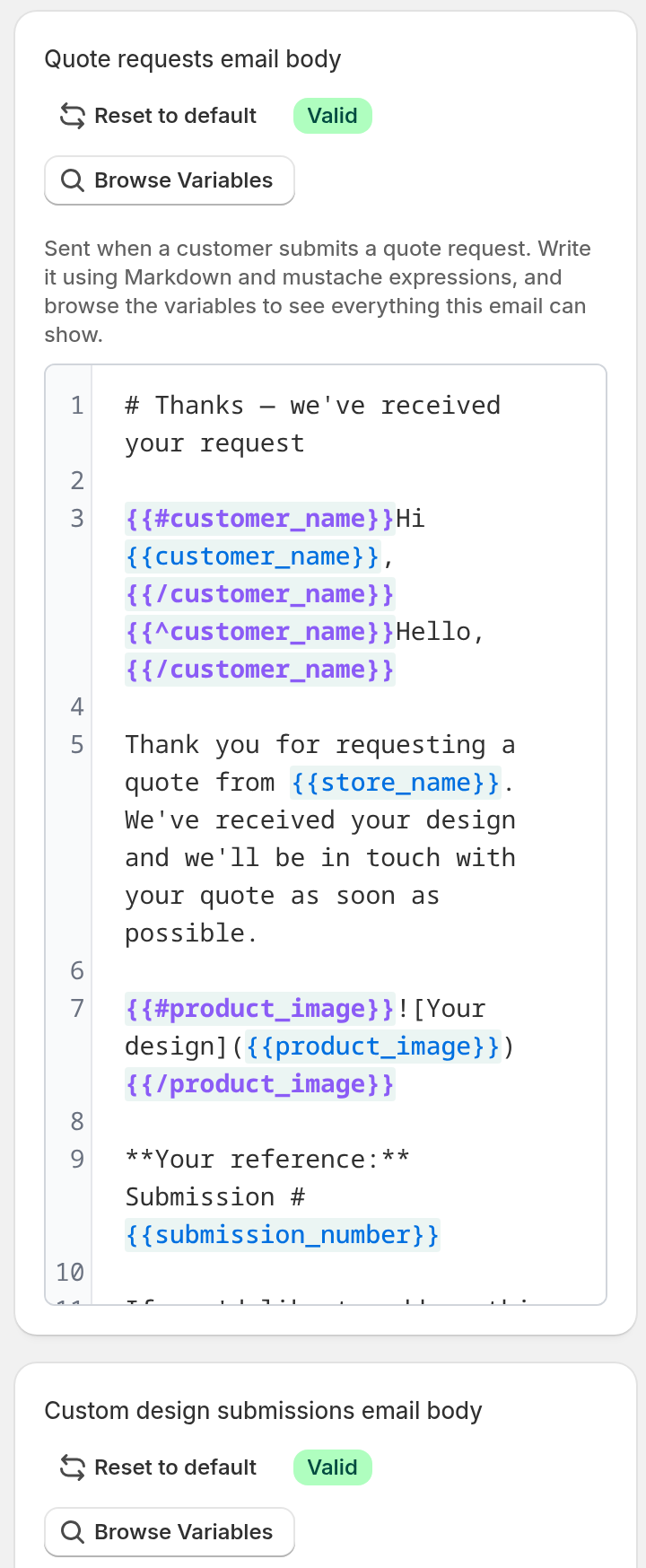
The bodies use the same editor as the other email templates. Click Browse Variables to see the values that you can add:
-
the name of your customer
-
the name of your Store
-
the form that your customer used
-
the submission number and date
-
a written description of the design
-
a preview image of the design
-
a preview image of the design on a white background
To make one body fit both types of submission, use the conditional blocks. The block is_quote shows its text for a quote request. The block is_custom_design shows its text for a custom design.
Sign Customiser sends the default body when your body has a syntax error. An example is a section that you did not close. A variable with a wrong name is different. It does not stop the email, and its place in the email is blank. The editor shows a warning count for a wrong variable name. Click Show details to read the Unknown variable message. A syntax error, such as an unclosed section, shows an error count. Check the counts before you click Save.
Note: Keep this email a plain acknowledgement. It is not a marketing email. Do not add offers or promotions.
Sender name and replies
Sender name is the name that your customer sees in their inbox list. Enter the name of your business. If you leave it blank, Sign Customiser uses your Store name only when Use branding for emails is on. If that setting is off, the email uses our default sender name. In that case, enter a name here.
Replies go to you, not to us. The reply address is the first address in the Receiver Email that you set for the form in Forms. If that field is blank and your Store is connected to Shopify, Sign Customiser uses the contact email that you gave Sign Customiser for your Store. If that is also blank, it uses the email address that Shopify holds for your store. If your Store is not connected to Shopify, or those emails are blank, it uses the email address of the Store owner. When your customer replies, the reply reaches your inbox.
Your logo and colours
This page does not set how the email looks. The look comes from your Store brand settings. The Manufacturer Email and the Custom Design Form Email use the same settings.
-
In your Sign Customiser admin, go to Your Store → Store Settings. In your Shopify admin, open the Sign Customiser app. On its Home page, click Tools & Settings, then click Store Settings.
-
Find the Brand section.
-
Tick Use branding for emails. The email then uses your primary colour and, if you have uploaded a logo, your logo. You can upload your logo in this section.
-
Click Save in the Brand section.
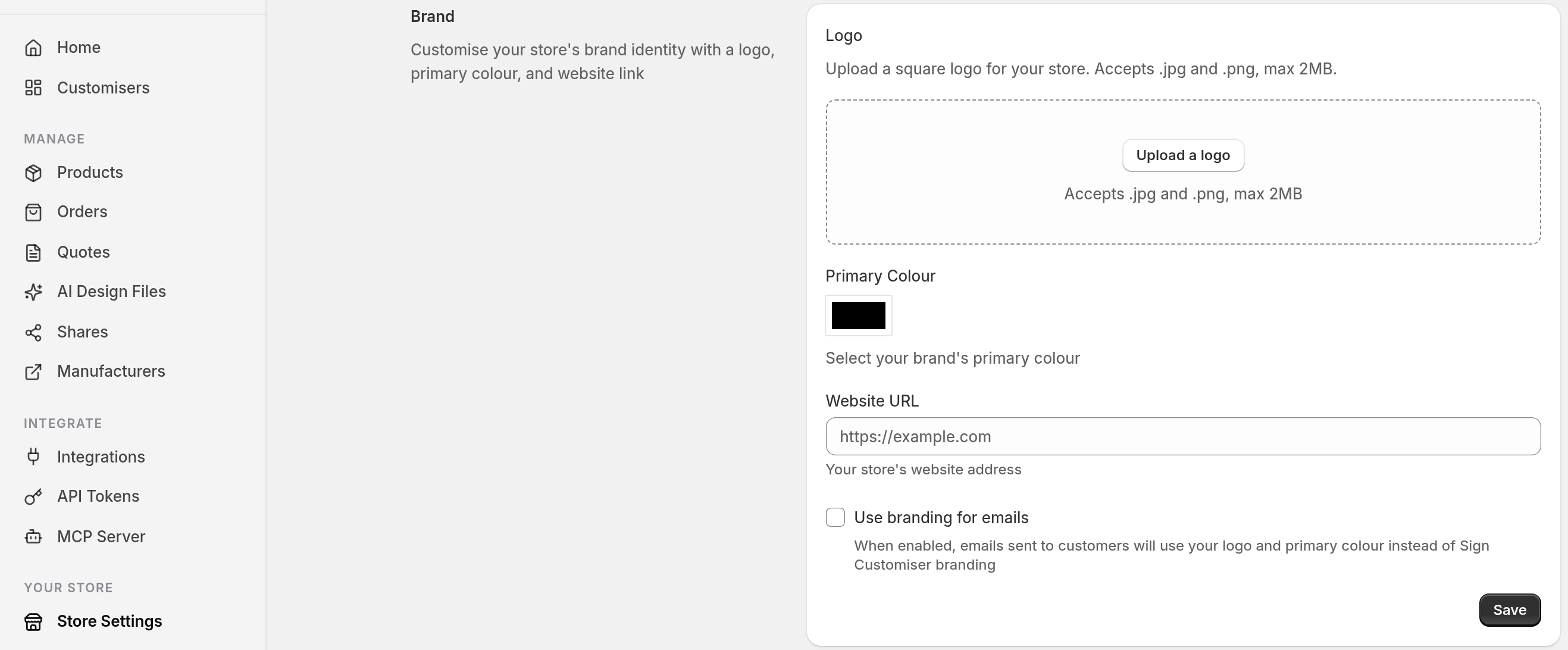
If you do not tick Use branding for emails, the email uses our default styling. Each Email Workflows page has a Brand settings link at the top. The link opens this page.
What it never includes
The confirmation shows less than the email that you receive. It never shows a price. This is safe on a customiser where you hide prices in Quote Mode. It never shows your AI credit balance or billing links. It never shows the processed vector file that your credits paid for. It never shows download links to the raw files that your customer uploaded.
With the default text, your customer gets an acknowledgement, a reference number and a view of their own design. Any variable from Browse Variables that you add to your text also reaches your customer.
One confirmation per address per form every 10 minutes
An address that submits the same form again within 10 minutes gets no second confirmation. This rule also applies when a browser sends the same submission twice. A different address on the same form is not affected.
Each form sends a maximum of 200 confirmations in 24 hours. After that, submissions get no confirmation until the 24 hours end.