

Why is add to cart blocked for some font characters?
Last updated:
A font can only draw the characters in its font file. A customer can type a character that the selected font cannot produce. What happens then depends on the pricing model:
-
Advanced Letter blocks the design by default.
-
Simple Letter and Frame Fit customisers (but not Lightbox) allow the design by default. The order is not marked.
-
Fixed Height customisers always block the design.
-
On a Lightbox customiser, unsupported characters in the text that a customer types always block add to cart.
This depends on the font. A backtick, an accented letter, or a symbol can work in one font and be missing from another font.
Why add to cart is blocked
The customiser can find that the selected font has no usable outline for a character. Then the customer sees the affected character. The customer cannot add the design to cart while protection is on.
This protection is most important for Advanced Letter customisers. Advanced Letter uses the font outline of each character to calculate the dimensions. Some Advanced Letter pricing methods also use the outlines to calculate the price.
Without a usable outline, a character can be missing or can use the font’s replacement glyph. The price, the dimensions, and the production artwork can also be wrong.
Recommended fix
Ask the customer to remove or replace the character, or to choose a font that supports it. You can also upload a compatible font.
Test each uploaded font with the letters, punctuation, and symbols that your customers use. Sign Customiser does not add missing characters to a font file.
Allow the customer to order anyway
-
Open Customisers in the sidebar. In the Shopify admin, open the app, then select Customisers in the app navigation.
-
Open the customiser that you want to change.
-
Go to General Settings.
-
Under Order safeguards, find Allow unsupported font characters.
-
On a Simple Letter or Frame Fit customiser (but not Lightbox), the box is ticked by default. Leave it ticked to allow the characters. Clear it to block them.
-
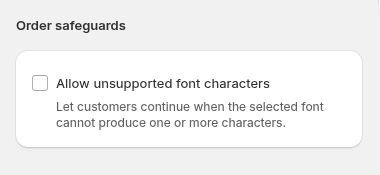
On an Advanced Letter customiser, the box is cleared by default. Tick it to allow the characters.
-
-
On an Advanced Letter customiser, the dialog Allow unsupported characters in Advanced Letter designs? opens. Read the warning. Tick the box that says I understand that I am responsible for checking the text, artwork, price and dimensions before production. Then select Allow unsupported characters. To cancel, select Keep blocking.
-
Select Save.
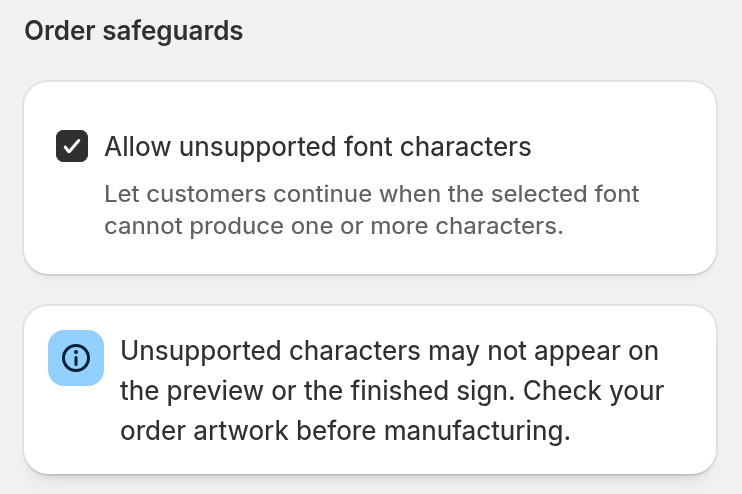
On a Simple Letter or Frame Fit customiser, the box starts ticked and a reminder shows below it:
On an Advanced Letter customiser, the box starts cleared:
Important
We do not recommend that you turn off this protection for Advanced Letter orders. Allow unsupported characters only if you will check and correct the text, artwork, price, and dimensions before production.
How the setting works for each pricing model
-
Simple Letter and Frame Fit (but not Lightbox): unsupported characters are allowed by default. You can turn the setting off to block them. While the setting is on, General Settings shows a reminder to check your order artwork before manufacturing.
-
Advanced Letter: unsupported characters are blocked by default. You must accept the production warning before you can allow them.
-
Fixed Height: unsupported characters are always blocked. General Settings does not show Allow unsupported font characters for these customisers.
-
Lightbox: unsupported characters in the text that a customer types always block add to cart. General Settings does not show Allow unsupported font characters for these customisers.
Where unsupported characters are allowed, a design that has only unsupported characters is still blocked, unless it has a visible icon or an uploaded graphic. This stops a sign that has no usable characters, icons or graphics from being ordered.
Block emojis
Allow unsupported font characters controls the characters that the selected font cannot draw. It does not find emojis. If the font can draw a symbol such as ♡ or ☆, this setting does not block it. On Simple Letter and Frame Fit customisers (but not Lightbox), unsupported characters are allowed by default. Thus a customer can order a sign with an emoji that the font cannot draw, if the sign also has text that the font can draw.
To block emojis, use the Block emojis setting:
-
Open Customisers in the sidebar. In the Shopify admin, open the app, then select Customisers in the app navigation.
-
Open the customiser that you want to change.
-
Go to General Settings.
-
Under Order safeguards, tick Block emojis.
-
Select Save.
When Block emojis is ticked, the customer cannot add the design to cart if the sign text has an emoji or an emoji-style symbol. The customer sees a message that shows each emoji to remove. The emoji message does not tell the customer to select a different font. Allow unsupported font characters does not change this.
-
Blocked: emojis such as 😀, flags and keycaps, the emoji form of symbols such as ❤️ and ☀️, and decorative symbols such as ♡ ☆ ✓.
-
Permitted: letters in all languages, numbers, ordinary punctuation and currency signs. © ® ™ and arrows are permitted without the emoji form. Icons from your icon set are not blocked.
Block emojis is off by default. It shows for all pricing models. To change or translate the message, go to Settings → Languages and open a language. In the Text editor section, edit Emojis not allowed. Keep {characters} where the emojis must show.
Check affected orders before production
On an Advanced Letter customiser where you allow unsupported characters, an order with an affected character is marked Production check required. The mark shows in the order details and in the order email. It lists the product, the character, the font ID, and the text row. The first text row is row 1.
The order email goes to the Receiver Email on the Manufacturer Email page of the customiser. If that field is empty, the email goes to the assigned manufacturer. If there is no manufacturer, the email goes to the shop owner’s email address in Shopify. On a Universal Store, it goes to the email address of the Store owner.
Simple Letter and Frame Fit orders are not marked. Check their text and artwork yourself. Compare the customer’s text with the preview and the production artwork. Correct the artwork, price, and dimensions before production.