Pricing - Simple Letter Model
Last updated:
Before configuring pricing, make sure you have already set up your Sizes.
Accessing the Pricing Settings
-
Go to the Sign Customiser Admin:
-
Universal subscribers: Go to Home in your account.
-
Shopify users: Navigate to Shopify admin → Apps and select Sign Customiser.
-
-
Click on Customisers in the menu.
-
Select your customiser.
-
From the left-hand menu, go to Core Setup → Pricing.
Create a Pricing Plan for Your Sizes
-
From the left-hand menu in your customiser, go to Core Setup → Pricing.
-
Click on the Add new pricing or edit an existing one.
-
Under the Price Settings section, give your pricing a title in the Label field (for internal use only).
-
In the Pricing for each size section, all the available sizes you created in Step 1 will be visible here.
Configure your pricing for each size:
-
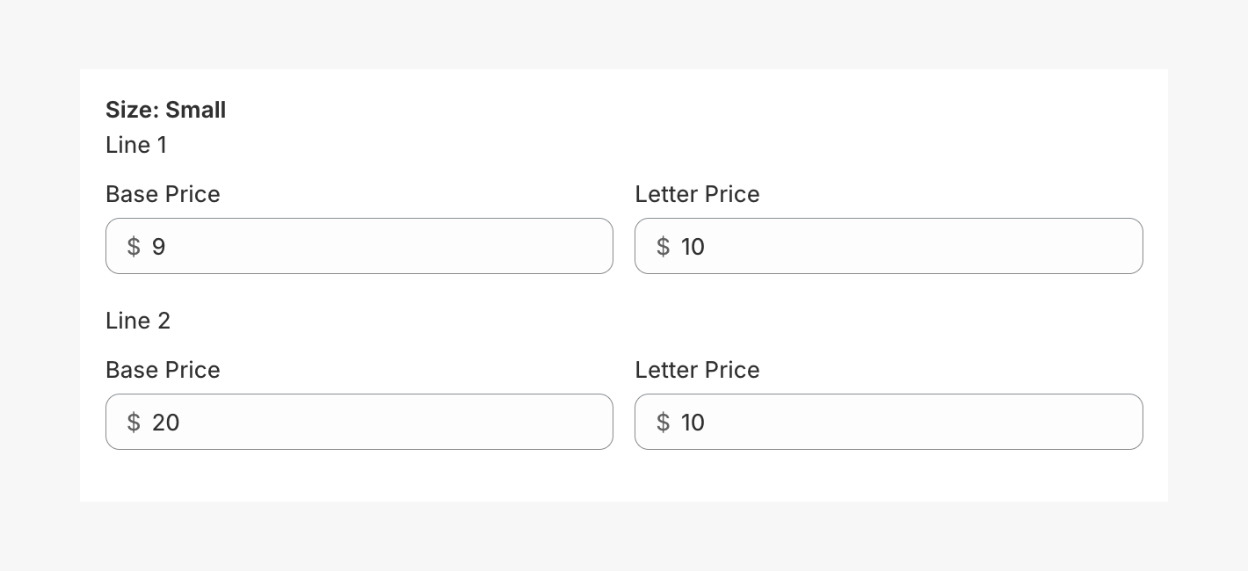
(Optional) Base Price - the cost for each line of text on the sign. You can set different base prices for the first, second line, third lines, etc.
Note: if you have Multiple Fonts option enabled, this setup will look a little. See Multiple Fonts guide for further details.
-
(Optional) Letter Price - cost per character based on the number of lines. Set both the base price and letter price for each line. If not needed, enter ‘0’.
-
-
Click Save.
How Pricing Works in the Simple Letter Model
The Simple Letter Model calculates the sign’s final price based on these factors:
-
Size selection – either width or height is fixed
-
Number of lines
-
Base price per line
-
Price per character per line
You can create multiple pricing rules and assign them to different fonts. For example, fonts that need more material or labour can be assigned a higher price tier.
Below are examples of how the calculation works.
Example 1: One Line of Text

Sign Details
Sign text: Awesome Sign
Font: Yellowtail font
Size: Small
Lines: 1
Line 1:
-
Base price for Line 1: $100
-
Characters: 11
-
Price per character: $20
Calculation
Final Price Formula = Base Price + (Character × Price per Character)
Total = 100 + (11 × 20) = $320.
Example 2: Two Lines of Text

Sign Details
Sign text line 1: Awesome
Sign text line 2: Sign
Font: Yellowtail font
Size: Small
Lines: 2
Line 1:
-
Base price: $100
-
Characters: 7
-
Price per character: $20
Line 2:
-
Base price: $60
-
Characters: 4
-
Price per character: $30
Calculation
Total Price of Each Line Formula = Base Price + (Character × Price per Character)
Final Price Formula = Total Price of Line 1 + Total Price of Line 2
Line 1: 100 + (7 × 20) = 240
Line 2: 60 + (4 × 30) = 180
Total = 240 + 180 = $420
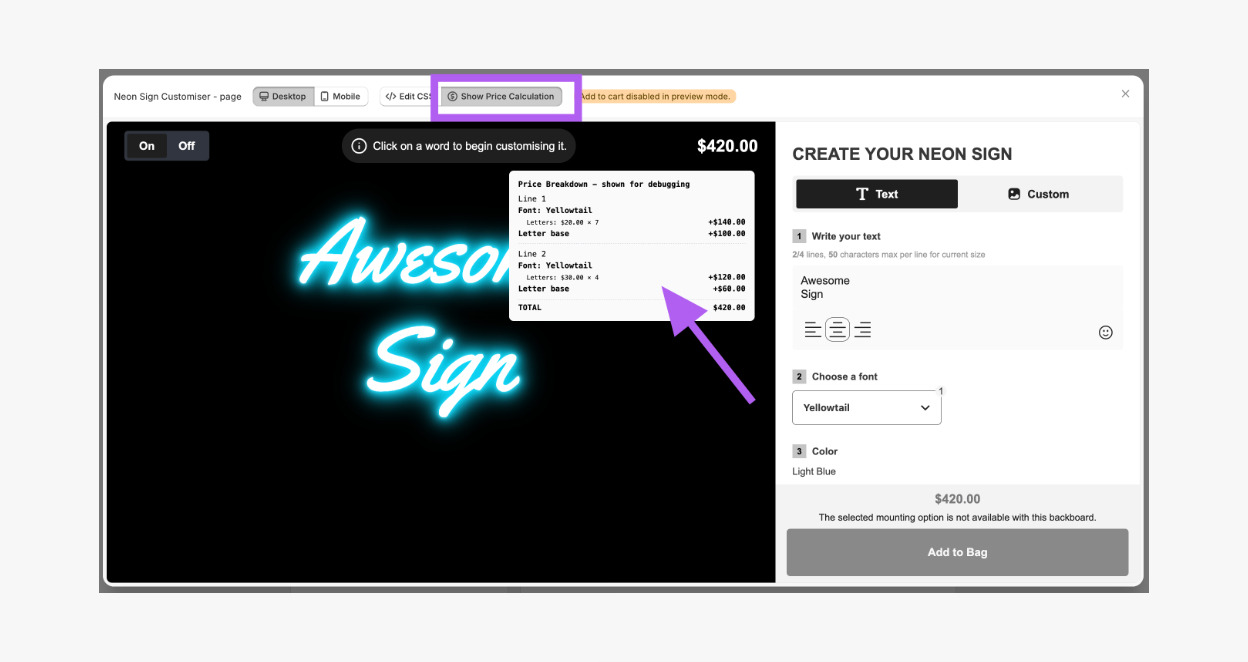
How to See Price Breakdown on the Customiser
You can view a detailed breakdown of how the total price is calculated by opening the Preview mode in your customiser. Click the Show Price Calculation button, and a popup will appear displaying the full price breakdown for each line and character.